<?xml version="1.0" encoding="utf-8"?><feed xmlns="http://www.w3.org/2005/Atom" ><generator uri="https://jekyllrb.com/" version="4.3.3">Jekyll</generator><link href="https://miuliano.me/feed.xml" rel="self" type="application/atom+xml" /><link href="https://miuliano.me/" rel="alternate" type="text/html" /><updated>2024-02-16T21:42:45+00:00</updated><id>https://miuliano.me/feed.xml</id><title type="html">Max Julian</title><subtitle>The personal website/portfolio of Max Julian.
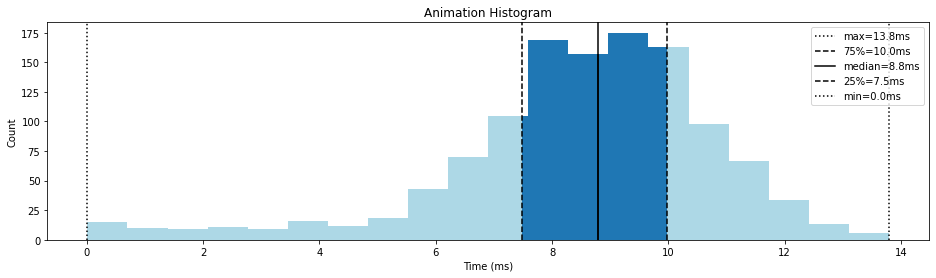
</subtitle><author><name>Max Julian</name></author><entry><title type="html">CPU Performance Reporting with Python</title><link href="https://miuliano.me/blog/2020/04/07/cpu-perf-reporting-w-python/" rel="alternate" type="text/html" title="CPU Performance Reporting with Python" /><published>2020-04-07T14:00:00+00:00</published><updated>2020-04-07T14:00:00+00:00</updated><id>https://miuliano.me/blog/2020/04/07/cpu-perf-reporting-w-python</id><content type="html" xml:base="https://miuliano.me/blog/2020/04/07/cpu-perf-reporting-w-python/"><![CDATA[<p>Making sense of cpu performance data for a game can be challenging. Understanding where and how to make optimizations is even harder. However, if we’re able to visualize the performance data you have in a comprehensible way, you can make the process a bit easier. Luckily, there are more than enough Python libraries to help us achieve that.</p>

<h2 id="introduction">Introduction</h2>

<p>The premise here is that you have some frame time samples collected over the course of a test run, broken down by various categories/systems, and stored in an accessible place (database, csv file, network service, etc.). Depending on the code paths involved, the frame time for each sample may vary widely between frames, but for optimization purposes we’re usually only concerned with <a href="https://en.wikipedia.org/wiki/Outlier">outliers</a> on the high end and the <a href="https://en.wikipedia.org/wiki/Central_tendency">central tendency</a>. For central tendency, your <a href="https://en.wikipedia.org/wiki/Median">median</a> is usually a better choice than the <a href="https://en.wikipedia.org/wiki/Mean">mean</a> as it’s more robust to those same outliers. You’re also going to be primarily concerned where the ‘bulk’ of those frame times fall to get a sense of overall performance for that category. <a href="https://en.wikipedia.org/wiki/Quantile">Quantiles</a> make a good measure here. This is often the 25-75% range, or if you’re aiming for consistent performance then something like the 5-95% range may make more sense.</p>

<p>The first step to visualizing this data is our good friend the <a href="https://en.wikipedia.org/wiki/Histogram">histogram</a>. This gives a nice overall picture of the frame time distributions and gives us some good initial insight into what’s going on under the hood.</p>

<figure>
    <img src="/assets/images/2020-04-07-cpu-perf-reporting-w-python/animation_histogram_example.png" />
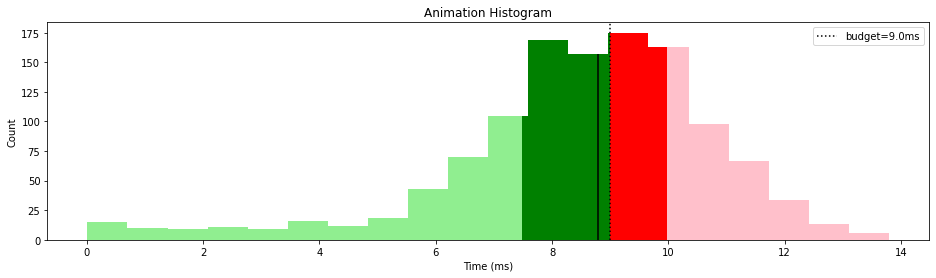
    <figcaption>An example of an animation frame time histogram. </figcaption>
</figure>

<p>In the example histogram above, the median tells us 50% of our data falls at or below 8.8ms. The 25th and 75th quantiles tell us 50% of our data also falls between 7.5ms and 10.0ms. The worst frame times fall at 13.8ms.</p>

<p>It’s typical to have a budget for each of the categories to give optimization work a target to focus on. In this example, if we budget 9ms of our frame time to animation, we can plot that on our graph to separate it into under and over budget samples.</p>

<figure>
    <img src="/assets/images/2020-04-07-cpu-perf-reporting-w-python/animation_histogram_w_budget_example.png" />
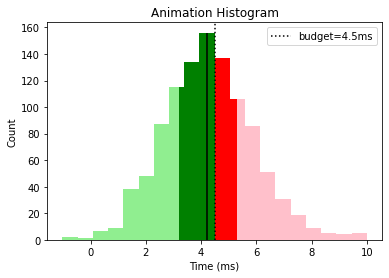
    <figcaption>Adding a budget to the animation histogram. </figcaption>
</figure>

<p>This tells us that we’re doing okay, with 75% of our data less than 1ms over budget. However, that does leave 25% of it in the concerning 10ms+ range. The 13.8ms frame may also be enough to push us below our target frame rate if we don’t have a lot of extra headroom, leading to noticeable stuttering in game. If we’re in the early days of optimization work, this graph tells us we’re on the right track but with some room for improvement.</p>

<h2 id="creating-graphs">Creating Graphs</h2>

<p>Generating these kinds of histograms is easily done using some off-the-shelf Python libraries created by some great open source projects. The tech stack I’m covering here includes:</p>
<ul>
  <li><a href="https://numpy.org/">NumPy</a> - <em>numerical methods for manipulating data</em></li>
  <li><a href="https://pandas.pydata.org/">Pandas</a> - <em>handles manipulating data</em></li>
  <li><a href="https://matplotlib.org/">Matplotlib</a> - <em>for generating graphs</em></li>
  <li><a href="https://jupyter.org/">Jupyter Notebook</a> - <em>an interactive Python environment that’s easily shared</em></li>
</ul>

<p>I won’t go into the details of getting all that up and running, <a href="https://ipython-books.github.io/">other tutorials</a> cover it in great detail, but suffice it to say you can get most of the way there with:</p>

<div class="language-bash highlighter-rouge"><div class="highlight"><pre class="highlight"><code>python <span class="nt">-m</span> pip <span class="nb">install </span>numpy pandas matplotlib jupyter
jupyter notebook
</code></pre></div></div>

<p>With the Jupyter notebook up and running, and assuming you can pull your data into a Pandas <a href="https://pandas.pydata.org/pandas-docs/stable/reference/frame.html">DataFrame</a>, we’ll move on to plotting it. To create a histogram using matplotlib we do the following:</p>

<div class="language-python highlighter-rouge"><div class="highlight"><pre class="highlight"><code><span class="kn">import</span> <span class="n">matplotlib</span> <span class="k">as</span> <span class="n">mpl</span>
<span class="kn">import</span> <span class="n">matplotlib.pyplot</span> <span class="k">as</span> <span class="n">plt</span>

<span class="n">fig</span><span class="p">,</span> <span class="n">ax</span> <span class="o">=</span> <span class="n">plt</span><span class="p">.</span><span class="nf">subplots</span><span class="p">(</span><span class="mi">1</span><span class="p">,</span> <span class="mi">1</span><span class="p">)</span> <span class="c1"># Create our single plot
</span><span class="n">N</span><span class="p">,</span> <span class="n">bins</span><span class="p">,</span> <span class="n">patches</span> <span class="o">=</span> <span class="n">ax</span><span class="p">.</span><span class="nf">hist</span><span class="p">(</span><span class="n">data_series</span><span class="p">)</span> <span class="c1"># Graph the histogram
</span></code></pre></div></div>

<p>Next, to colour the bars of our histogram, according to the style I outlined above, we have to adjust some of the patches.</p>

<div class="language-python highlighter-rouge"><div class="highlight"><pre class="highlight"><code><span class="k">for</span> <span class="n">index</span><span class="p">,</span> <span class="n">patch</span> <span class="ow">in</span> <span class="nf">enumerate</span><span class="p">(</span><span class="n">patches</span><span class="p">):</span>
    <span class="c1"># Here LOWER_QUANTILE and UPPER_QUANTILE is set to whatever
</span>    <span class="c1"># you'd like. For example, 0.25 and 0.75, respectively.
</span>    <span class="n">upper_quantile_value</span> <span class="o">=</span> <span class="n">data_series</span><span class="p">.</span><span class="nf">quantile</span><span class="p">(</span><span class="n">UPPER_QUANTILE</span><span class="p">)</span>
    <span class="n">lower_quantile_value</span> <span class="o">=</span> <span class="n">data_series</span><span class="p">.</span><span class="nf">quantile</span><span class="p">(</span><span class="n">LOWER_QUANTILE</span><span class="p">)</span>

    <span class="n">bin_lower_value</span> <span class="o">=</span> <span class="n">bins</span><span class="p">[</span><span class="n">index</span><span class="p">]</span>
    <span class="n">bin_upper_value</span> <span class="o">=</span> <span class="n">bins</span><span class="p">[</span><span class="n">index</span> <span class="o">+</span> <span class="mi">1</span><span class="p">]</span>

    <span class="c1"># Next, we colour each patch based on whether it falls inside or outside our
</span>    <span class="c1"># quantiles and whether it's above/below our budget.
</span>    <span class="c1">#
</span>    <span class="c1"># The helper function 'split_rectangular_patch' (shown below) will split the patch
</span>    <span class="c1"># in two if the split value falls within it, colouring each piece accordingly.
</span>    <span class="k">if</span> <span class="n">bin_upper_value</span> <span class="o">&lt;</span> <span class="n">lower_quantile_value</span> <span class="ow">or</span> <span class="n">bin_lower_value</span> <span class="o">&gt;</span> <span class="n">upper_quantile_value</span><span class="p">:</span>
        <span class="c1"># Patch is outside quantiles.
</span>        <span class="nf">split_rectangular_patch</span><span class="p">(</span><span class="n">patch</span><span class="p">,</span>
                                <span class="n">budget</span><span class="p">,</span>
                                <span class="n">COLOUR_BELOW_BUDGET_QUANTILE</span><span class="p">,</span>
                                <span class="n">COLOUR_ABOVE_BUDGET_QUANTILE</span><span class="p">)</span>
    <span class="k">elif</span> <span class="n">bin_lower_value</span> <span class="o">&gt;</span> <span class="n">lower_quantile_value</span> <span class="ow">and</span> <span class="n">bin_upper_value</span> <span class="o">&lt;</span> <span class="n">upper_quantile_value</span><span class="p">:</span>
        <span class="c1"># Patch is inside quantiles.
</span>        <span class="nf">split_rectangular_patch</span><span class="p">(</span><span class="n">patch</span><span class="p">,</span>
                                <span class="n">budget</span><span class="p">,</span>
                                <span class="n">COLOUR_BELOW_BUDGET</span><span class="p">,</span>
                                <span class="n">COLOUR_ABOVE_BUDGET</span><span class="p">)</span>
    <span class="k">elif</span> <span class="n">bin_lower_value</span> <span class="o">&lt;</span> <span class="n">lower_quantile_value</span> <span class="ow">and</span> <span class="n">bin_upper_value</span> <span class="o">&gt;</span> <span class="n">lower_quantile_value</span><span class="p">:</span>
        <span class="c1"># Patch straddles the lower quantile, so split the patch in two.
</span>        <span class="n">lower_patch</span><span class="p">,</span> <span class="n">upper_patch</span> <span class="o">=</span> <span class="nf">split_rectangular_patch</span><span class="p">(</span><span class="n">patch</span><span class="p">,</span>
                                                            <span class="n">lower_quantile_value</span><span class="p">,</span>
                                                            <span class="n">COLOUR_BELOW_BUDGET_QUANTILE</span><span class="p">,</span>
                                                            <span class="n">COLOUR_BELOW_BUDGET</span><span class="p">)</span>
        <span class="c1"># Split each new patch by the budget (if necessary).
</span>        <span class="nf">split_rectangular_patch</span><span class="p">(</span><span class="n">lower_patch</span><span class="p">,</span>
                                <span class="n">budget</span><span class="p">,</span>
                                <span class="n">COLOUR_BELOW_BUDGET_QUANTILE</span><span class="p">,</span>
                                <span class="n">COLOUR_ABOVE_BUDGET_QUANTILE</span><span class="p">)</span>
        <span class="nf">split_rectangular_patch</span><span class="p">(</span><span class="n">upper_patch</span><span class="p">,</span>
                                <span class="n">budget</span><span class="p">,</span>
                                <span class="n">COLOUR_BELOW_BUDGET</span><span class="p">,</span>
                                <span class="n">COLOUR_ABOVE_BUDGET</span><span class="p">)</span>
    <span class="k">elif</span> <span class="n">bin_lower_value</span> <span class="o">&lt;</span> <span class="n">upper_quantile_value</span> <span class="ow">and</span> <span class="n">bin_upper_value</span> <span class="o">&gt;</span> <span class="n">upper_quantile_value</span><span class="p">:</span>
        <span class="c1"># Patch straddles the upper quantile, so split the patch in two.
</span>        <span class="n">lower_patch</span><span class="p">,</span> <span class="n">upper_patch</span> <span class="o">=</span> <span class="nf">split_rectangular_patch</span><span class="p">(</span><span class="n">patch</span><span class="p">,</span>
                                                            <span class="n">upper_quantile_value</span><span class="p">,</span>
                                                            <span class="n">COLOUR_BELOW_BUDGET</span><span class="p">,</span>
                                                            <span class="n">COLOUR_BELOW_BUDGET_QUANTILE</span><span class="p">)</span>
        <span class="c1"># Split each new patch by the budget (if necessary).
</span>        <span class="nf">split_rectangular_patch</span><span class="p">(</span><span class="n">lower_patch</span><span class="p">,</span>
                                <span class="n">budget</span><span class="p">,</span>
                                <span class="n">COLOUR_BELOW_BUDGET</span><span class="p">,</span>
                                <span class="n">COLOUR_ABOVE_BUDGET</span><span class="p">)</span>
        <span class="nf">split_rectangular_patch</span><span class="p">(</span><span class="n">upper_patch</span><span class="p">,</span>
                                <span class="n">budget</span><span class="p">,</span>
                                <span class="n">COLOUR_BELOW_BUDGET_QUANTILE</span><span class="p">,</span>
                                <span class="n">COLOUR_ABOVE_BUDGET_QUANTILE</span><span class="p">)</span>
</code></pre></div></div>

<p>The helper function <code class="language-plaintext highlighter-rouge">split_rectangular_patch</code> is defined as:</p>

<div class="language-python highlighter-rouge"><div class="highlight"><pre class="highlight"><code><span class="k">def</span> <span class="nf">split_rectangular_patch</span><span class="p">(</span><span class="n">patch</span><span class="p">,</span> <span class="n">split_value</span><span class="p">,</span> <span class="n">below_color</span><span class="p">,</span> <span class="n">above_color</span><span class="p">):</span>
    <span class="sh">'''</span><span class="s">Helper function to split a vertical histogram patch</span><span class="sh">'''</span>
    <span class="n">h</span> <span class="o">=</span> <span class="n">patch</span><span class="p">.</span><span class="nf">get_height</span><span class="p">()</span>
    <span class="n">w</span> <span class="o">=</span> <span class="n">patch</span><span class="p">.</span><span class="nf">get_width</span><span class="p">()</span>
    <span class="n">x</span> <span class="o">=</span> <span class="n">patch</span><span class="p">.</span><span class="nf">get_x</span><span class="p">()</span>

    <span class="n">d</span> <span class="o">=</span> <span class="p">(</span><span class="n">split_value</span> <span class="o">-</span> <span class="n">x</span><span class="p">)</span> <span class="o">/</span> <span class="n">w</span>

    <span class="k">if</span> <span class="n">d</span> <span class="o">&gt;</span> <span class="mi">1</span><span class="p">:</span>
        <span class="c1"># Patch is completely below split_value, no split required
</span>        <span class="n">patch</span><span class="p">.</span><span class="nf">set_facecolor</span><span class="p">(</span><span class="n">below_color</span><span class="p">)</span>
        <span class="nf">return </span><span class="p">(</span><span class="n">patch</span><span class="p">,)</span>
    <span class="k">elif</span> <span class="n">d</span> <span class="o">&lt;</span> <span class="mi">0</span><span class="p">:</span>
        <span class="c1"># Patch is completely above split_value, no split required
</span>        <span class="n">patch</span><span class="p">.</span><span class="nf">set_facecolor</span><span class="p">(</span><span class="n">above_color</span><span class="p">)</span>
        <span class="nf">return </span><span class="p">(</span><span class="n">patch</span><span class="p">,)</span>

    <span class="c1"># Below patch
</span>    <span class="n">patch</span><span class="p">.</span><span class="nf">set_facecolor</span><span class="p">(</span><span class="n">below_color</span><span class="p">)</span>
    <span class="n">patch</span><span class="p">.</span><span class="nf">set_width</span><span class="p">(</span><span class="n">d</span> <span class="o">*</span> <span class="n">w</span><span class="p">)</span>

    <span class="c1"># Above patch
</span>    <span class="n">new_patch</span> <span class="o">=</span> <span class="n">mpl</span><span class="p">.</span><span class="n">patches</span><span class="p">.</span><span class="nc">Rectangle</span><span class="p">((</span><span class="n">split_value</span><span class="p">,</span> <span class="mi">0</span><span class="p">),</span> <span class="p">(</span><span class="mi">1</span> <span class="o">-</span> <span class="n">d</span><span class="p">)</span> <span class="o">*</span> <span class="n">w</span><span class="p">,</span> <span class="n">h</span><span class="p">)</span>
    <span class="n">new_patch</span><span class="p">.</span><span class="nf">set_facecolor</span><span class="p">(</span><span class="n">above_color</span><span class="p">)</span>
    <span class="nf">return </span><span class="p">(</span><span class="n">patch</span><span class="p">,</span> <span class="n">ax</span><span class="p">.</span><span class="nf">add_patch</span><span class="p">(</span><span class="n">new_patch</span><span class="p">))</span>
</code></pre></div></div>

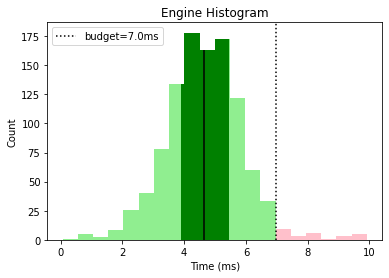
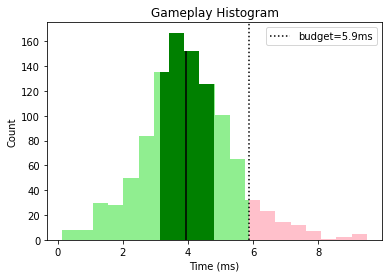
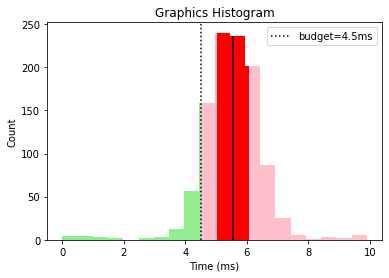
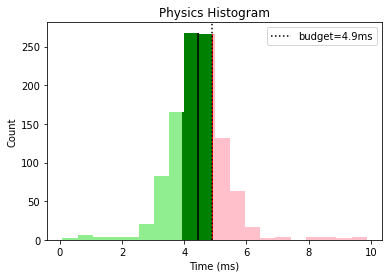
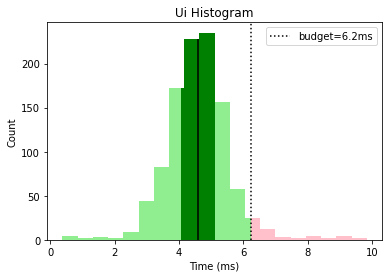
<p>Putting this all together, we can quickly generate these histograms for each of our performance data:</p>

<figure class="third">
    <img src="/assets/images/2020-04-07-cpu-perf-reporting-w-python/animation_histogram.png" />
    <img src="/assets/images/2020-04-07-cpu-perf-reporting-w-python/engine_histogram.png" />
    <img src="/assets/images/2020-04-07-cpu-perf-reporting-w-python/gameplay_histogram.png" />
    <img src="/assets/images/2020-04-07-cpu-perf-reporting-w-python/graphics_histogram.png" />
    <img src="/assets/images/2020-04-07-cpu-perf-reporting-w-python/physics_histogram.png" />
    <img src="/assets/images/2020-04-07-cpu-perf-reporting-w-python/ui_histogram.png" />
    <figcaption>Histograms by category for a single capture.</figcaption>
</figure>

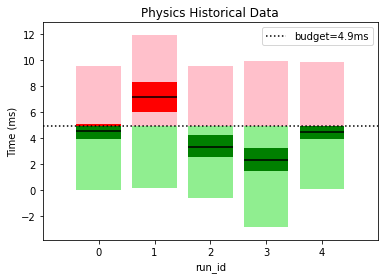
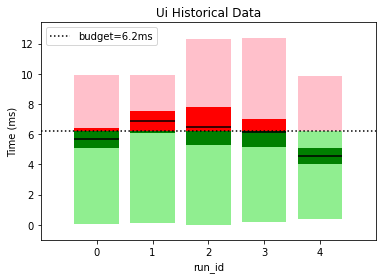
<p>This gives us a nice overall view that tells us that graphics and animation need some optimization work while the other categories are looking good, with a few outliers that could be investigated.</p>

<h2 id="historical-trends">Historical Trends</h2>

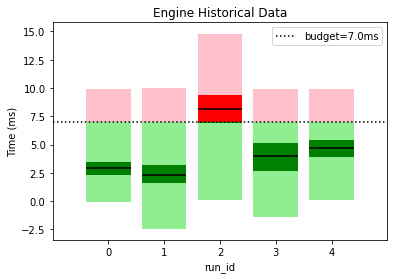
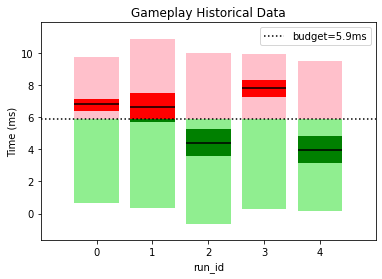
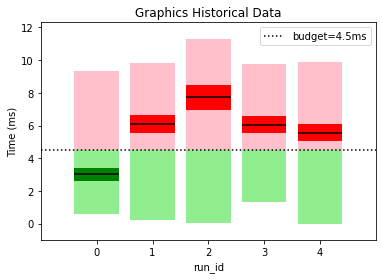
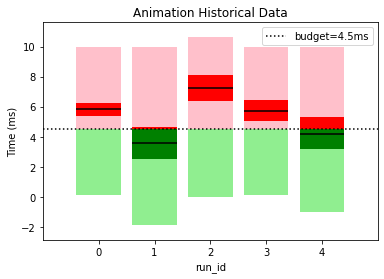
<p>The next step is to look at the historical trends for these distributions across multiple runs, builds, or platforms. In this example, I’m going to pretend we’ve captured data for the last few builds and are looking to compare them. We can combine multiple histograms by thinking of it like we’re viewing each from above, and then plotting them next to each other:</p>

<figure class="third">
    <img src="/assets/images/2020-04-07-cpu-perf-reporting-w-python/animation_historical.png" />
    <img src="/assets/images/2020-04-07-cpu-perf-reporting-w-python/engine_historical.png" />
    <img src="/assets/images/2020-04-07-cpu-perf-reporting-w-python/gameplay_historical.png" />
    <img src="/assets/images/2020-04-07-cpu-perf-reporting-w-python/graphics_historical.png" />
    <img src="/assets/images/2020-04-07-cpu-perf-reporting-w-python/physics_historical.png" />
    <img src="/assets/images/2020-04-07-cpu-perf-reporting-w-python/ui_historical.png" />
    <figcaption>Historical trends for each category.</figcaption>
</figure>

<p>This gives a clear picture of how our performance is varying between builds and lets us know if our optimization efforts are going in the right direction. For example, graphics appears to have had a regression since the first build wheares UI has consistently improved over time. It also helps us spot if performance outliers have been fixed; engine had a spike for run_id=2 but it was fixed in later builds.</p>

<h2 id="creating-the-historical-trend-graphs">Creating the Historical Trend Graphs</h2>

<p>Unfortunately, matplotlib doesn’t provide a plot like this by default (boxplot comes close), so instead we’ll build the graph by hand. For each category, we can do something like the following:</p>

<div class="language-python highlighter-rouge"><div class="highlight"><pre class="highlight"><code><span class="c1"># Some configuration values for our graph.
</span><span class="n">BAR_WIDTH</span> <span class="o">=</span> <span class="mf">0.8</span>
<span class="n">half_bar_width</span> <span class="o">=</span> <span class="n">BAR_WIDTH</span> <span class="o">/</span> <span class="mf">2.0</span>
<span class="n">BAR_TOP_MARGIN</span> <span class="o">=</span> <span class="mi">1</span>

<span class="c1"># As always, start by creating the plot.
</span><span class="n">fig</span><span class="p">,</span> <span class="n">ax</span> <span class="o">=</span> <span class="n">plt</span><span class="p">.</span><span class="nf">subplots</span><span class="p">(</span><span class="mi">1</span><span class="p">,</span> <span class="mi">1</span><span class="p">)</span>

<span class="c1"># A list of our target quantiles.
</span><span class="n">historical_quantiles</span> <span class="o">=</span> <span class="p">(</span><span class="mi">0</span><span class="p">,</span> <span class="n">LOWER_QUANTILE</span><span class="p">,</span> <span class="mf">0.5</span><span class="p">,</span> <span class="n">UPPER_QUANTILE</span><span class="p">,</span> <span class="mi">1</span><span class="p">)</span>

<span class="c1"># I've used a groupby by 'run_id' to create the df_groupby DataFrame.
</span><span class="n">df_quantiles</span> <span class="o">=</span> <span class="n">df_groupby</span><span class="p">[</span><span class="n">category</span><span class="p">].</span><span class="nf">quantile</span><span class="p">(</span><span class="n">historical_quantiles</span><span class="p">).</span><span class="nf">unstack</span><span class="p">()</span>

<span class="n">y_min</span> <span class="o">=</span> <span class="mf">1E10</span>
<span class="n">y_max</span> <span class="o">=</span> <span class="o">-</span><span class="mi">1</span>

<span class="c1"># Iterate over each row in our data set and create a patch for each
# pair of quantiles.
</span><span class="k">for</span> <span class="n">run_id</span><span class="p">,</span> <span class="n">row</span> <span class="ow">in</span> <span class="n">df_quantiles</span><span class="p">.</span><span class="nf">iterrows</span><span class="p">():</span>
    <span class="k">for</span> <span class="n">lower</span><span class="p">,</span> <span class="n">upper</span> <span class="ow">in</span> <span class="nf">pairwise</span><span class="p">(</span><span class="n">historical_quantiles</span><span class="p">):</span>

        <span class="n">lower_value</span> <span class="o">=</span> <span class="n">row</span><span class="p">[</span><span class="n">lower</span><span class="p">]</span>
        <span class="n">upper_value</span> <span class="o">=</span> <span class="n">row</span><span class="p">[</span><span class="n">upper</span><span class="p">]</span>

        <span class="k">if</span> <span class="n">upper_value</span> <span class="o">&lt;</span> <span class="n">budget</span> <span class="ow">or</span> <span class="n">lower_value</span> <span class="o">&gt;</span> <span class="n">budget</span><span class="p">:</span>
            <span class="c1"># Single patch, coloured based on above/below budget and above/below quartile
</span>            <span class="n">patch_lower_upper</span> <span class="o">=</span> <span class="n">mpl</span><span class="p">.</span><span class="n">patches</span><span class="p">.</span><span class="nc">Rectangle</span><span class="p">((</span><span class="n">run_id</span> <span class="o">-</span> <span class="n">half_bar_width</span><span class="p">,</span> <span class="n">lower_value</span><span class="p">),</span>
                                                        <span class="n">BAR_WIDTH</span><span class="p">,</span>
                                                        <span class="n">upper_value</span> <span class="o">-</span> <span class="n">lower_value</span><span class="p">)</span>
            <span class="k">if</span> <span class="n">upper_value</span> <span class="o">&lt;</span> <span class="n">budget</span><span class="p">:</span>
                <span class="k">if</span> <span class="n">lower</span> <span class="ow">in</span> <span class="p">(</span><span class="mi">0</span><span class="p">,</span> <span class="n">UPPER_QUANTILE</span><span class="p">):</span>
                    <span class="n">patch_lower_upper</span><span class="p">.</span><span class="nf">set_facecolor</span><span class="p">(</span><span class="n">COLOUR_BELOW_BUDGET_QUANTILE</span><span class="p">)</span>
                <span class="k">else</span><span class="p">:</span>
                    <span class="n">patch_lower_upper</span><span class="p">.</span><span class="nf">set_facecolor</span><span class="p">(</span><span class="n">COLOUR_BELOW_BUDGET</span><span class="p">)</span>
            <span class="k">else</span><span class="p">:</span>
                <span class="k">if</span> <span class="n">lower</span> <span class="ow">in</span> <span class="p">(</span><span class="mi">0</span><span class="p">,</span> <span class="n">UPPER_QUANTILE</span><span class="p">):</span>
                    <span class="n">patch_lower_upper</span><span class="p">.</span><span class="nf">set_facecolor</span><span class="p">(</span><span class="n">COLOUR_ABOVE_BUDGET_QUANTILE</span><span class="p">)</span>
                <span class="k">else</span><span class="p">:</span>
                    <span class="n">patch_lower_upper</span><span class="p">.</span><span class="nf">set_facecolor</span><span class="p">(</span><span class="n">COLOUR_ABOVE_BUDGET</span><span class="p">)</span>

            <span class="n">ax</span><span class="p">.</span><span class="nf">add_patch</span><span class="p">(</span><span class="n">patch_lower_upper</span><span class="p">)</span>
        <span class="k">else</span><span class="p">:</span>
            <span class="c1"># Split patch into region above and below budget
</span>            <span class="n">patch_lower_budget</span> <span class="o">=</span> <span class="n">mpl</span><span class="p">.</span><span class="n">patches</span><span class="p">.</span><span class="nc">Rectangle</span><span class="p">((</span><span class="n">run_id</span> <span class="o">-</span> <span class="n">half_bar_width</span><span class="p">,</span> <span class="n">lower_value</span><span class="p">),</span>
                                                        <span class="n">BAR_WIDTH</span><span class="p">,</span>
                                                        <span class="n">budget</span> <span class="o">-</span> <span class="n">lower_value</span><span class="p">)</span>
            <span class="k">if</span> <span class="n">lower</span> <span class="ow">in</span> <span class="p">(</span><span class="mi">0</span><span class="p">,</span> <span class="n">UPPER_QUANTILE</span><span class="p">):</span>
                <span class="n">patch_lower_budget</span><span class="p">.</span><span class="nf">set_facecolor</span><span class="p">(</span><span class="n">COLOUR_BELOW_BUDGET_QUANTILE</span><span class="p">)</span>
            <span class="k">else</span><span class="p">:</span>
                <span class="n">patch_lower_budget</span><span class="p">.</span><span class="nf">set_facecolor</span><span class="p">(</span><span class="n">COLOUR_BELOW_BUDGET</span><span class="p">)</span>

            <span class="n">ax</span><span class="p">.</span><span class="nf">add_patch</span><span class="p">(</span><span class="n">patch_lower_budget</span><span class="p">)</span>

            <span class="n">patch_budget_upper</span> <span class="o">=</span> <span class="n">mpl</span><span class="p">.</span><span class="n">patches</span><span class="p">.</span><span class="nc">Rectangle</span><span class="p">((</span><span class="n">run_id</span> <span class="o">-</span> <span class="n">half_bar_width</span><span class="p">,</span> <span class="n">budget</span><span class="p">),</span>
                                                        <span class="n">BAR_WIDTH</span><span class="p">,</span>
                                                        <span class="n">upper_value</span> <span class="o">-</span> <span class="n">budget</span><span class="p">)</span>
            <span class="k">if</span> <span class="n">lower</span> <span class="ow">in</span> <span class="p">(</span><span class="mi">0</span><span class="p">,</span> <span class="n">UPPER_QUANTILE</span><span class="p">):</span>
                <span class="n">patch_budget_upper</span><span class="p">.</span><span class="nf">set_facecolor</span><span class="p">(</span><span class="n">COLOUR_ABOVE_BUDGET_QUANTILE</span><span class="p">)</span>
            <span class="k">else</span><span class="p">:</span>
                <span class="n">patch_budget_upper</span><span class="p">.</span><span class="nf">set_facecolor</span><span class="p">(</span><span class="n">COLOUR_ABOVE_BUDGET</span><span class="p">)</span>

            <span class="n">ax</span><span class="p">.</span><span class="nf">add_patch</span><span class="p">(</span><span class="n">patch_budget_upper</span><span class="p">)</span>

    <span class="c1"># Add the median for each run as a horizontal line.
</span>    <span class="n">ax</span><span class="p">.</span><span class="nf">hlines</span><span class="p">(</span><span class="n">row</span><span class="p">[</span><span class="mf">0.5</span><span class="p">],</span> <span class="n">run_id</span> <span class="o">-</span> <span class="n">half_bar_width</span><span class="p">,</span> <span class="n">run_id</span> <span class="o">+</span> <span class="n">half_bar_width</span><span class="p">)</span>

    <span class="c1"># Track the smallest and largest y-value so we can set limits later.
</span>    <span class="n">y_min</span> <span class="o">=</span> <span class="nf">min</span><span class="p">(</span><span class="n">y_min</span><span class="p">,</span> <span class="n">row</span><span class="p">.</span><span class="nf">min</span><span class="p">())</span>
    <span class="n">y_max</span> <span class="o">=</span> <span class="nf">max</span><span class="p">(</span><span class="n">y_max</span><span class="p">,</span> <span class="n">row</span><span class="p">.</span><span class="nf">max</span><span class="p">())</span>

<span class="c1"># I've made some assumptions here that -1 is one less than our smallest run_id,
# and NUMBER_OF_RUNS is one greater than our largest. You'll have to handle your
# own case accordingly.
</span><span class="n">ax</span><span class="p">.</span><span class="nf">set_xlim</span><span class="p">(</span><span class="o">-</span><span class="mi">1</span><span class="p">,</span> <span class="n">NUMBER_OF_RUNS</span><span class="p">)</span>
<span class="n">ax</span><span class="p">.</span><span class="nf">set_ylim</span><span class="p">(</span><span class="n">y_min</span> <span class="o">-</span> <span class="n">BAR_TOP_MARGIN</span><span class="p">,</span> <span class="n">y_max</span> <span class="o">+</span> <span class="n">BAR_TOP_MARGIN</span><span class="p">)</span>

<span class="c1"># Add budget line
</span><span class="n">ax</span><span class="p">.</span><span class="nf">axhline</span><span class="p">(</span><span class="n">budget</span><span class="p">,</span> <span class="n">color</span><span class="o">=</span><span class="sh">'</span><span class="s">black</span><span class="sh">'</span><span class="p">,</span> <span class="n">label</span><span class="o">=</span><span class="sa">f</span><span class="sh">"</span><span class="s">budget=</span><span class="si">{</span><span class="n">budget</span><span class="si">:</span><span class="p">.</span><span class="mi">1</span><span class="n">f</span><span class="si">}</span><span class="s">ms</span><span class="sh">"</span><span class="p">,</span> <span class="n">linestyle</span><span class="o">=</span><span class="sh">'</span><span class="s">:</span><span class="sh">'</span><span class="p">)</span>

<span class="c1"># Use whichever locator makes sense here. I'm assuming integer groups.
</span><span class="kn">from</span> <span class="n">matplotlib.ticker</span> <span class="kn">import</span> <span class="n">MaxNLocator</span>
<span class="n">ax</span><span class="p">.</span><span class="n">xaxis</span><span class="p">.</span><span class="nf">set_major_locator</span><span class="p">(</span><span class="nc">MaxNLocator</span><span class="p">(</span><span class="n">integer</span><span class="o">=</span><span class="bp">True</span><span class="p">,</span> <span class="n">prune</span><span class="o">=</span><span class="sh">'</span><span class="s">both</span><span class="sh">'</span><span class="p">))</span>

<span class="c1"># Configure plot
</span><span class="n">ax</span><span class="p">.</span><span class="nf">set_title</span><span class="p">(</span><span class="sa">f</span><span class="sh">"</span><span class="si">{</span><span class="n">category</span><span class="p">.</span><span class="nf">title</span><span class="p">()</span><span class="si">}</span><span class="s"> Historical Data</span><span class="sh">"</span><span class="p">)</span>
<span class="n">ax</span><span class="p">.</span><span class="nf">set_xlabel</span><span class="p">(</span><span class="n">GROUP_BY_COLUMN</span><span class="p">)</span>
<span class="n">ax</span><span class="p">.</span><span class="nf">set_ylabel</span><span class="p">(</span><span class="sh">'</span><span class="s">Time (ms)</span><span class="sh">'</span><span class="p">)</span>
<span class="n">ax</span><span class="p">.</span><span class="nf">legend</span><span class="p">()</span>
</code></pre></div></div>

<h2 id="conclusion">Conclusion</h2>

<p>The graphs I’ve outlined here are but one way to visualize CPU performance data, but my hope is this gives an example of a good starting place for exploration. Libraries like Matplotlib provide a flexible way to make great graphs, so whatever your needs for visualization there is probably a way to generate it with these kind of tools.</p>

<h2 id="source-code">Source Code</h2>

<p>All the source code for generating these plots can be found here:</p>

<p><a href="/assets/performance-reporting.ipynb">Source Code Jupyter Notebook</a></p>]]></content><author><name>Max Julian</name></author><summary type="html"><![CDATA[Making sense of cpu performance data for a game can be challenging. Understanding where and how to make optimizations is even harder. However, if we’re able to visualize the performance data you have in a comprehensible way, you can make the process a bit easier. Luckily, there are more than enough Python libraries to help us achieve that. Introduction The premise here is that you have some frame time samples collected over the course of a test run, broken down by various categories/systems, and stored in an accessible place (database, csv file, network service, etc.). Depending on the code paths involved, the frame time for each sample may vary widely between frames, but for optimization purposes we’re usually only concerned with outliers on the high end and the central tendency. For central tendency, your median is usually a better choice than the mean as it’s more robust to those same outliers. You’re also going to be primarily concerned where the ‘bulk’ of those frame times fall to get a sense of overall performance for that category. Quantiles make a good measure here. This is often the 25-75% range, or if you’re aiming for consistent performance then something like the 5-95% range may make more sense. The first step to visualizing this data is our good friend the histogram. This gives a nice overall picture of the frame time distributions and gives us some good initial insight into what’s going on under the hood. An example of an animation frame time histogram. In the example histogram above, the median tells us 50% of our data falls at or below 8.8ms. The 25th and 75th quantiles tell us 50% of our data also falls between 7.5ms and 10.0ms. The worst frame times fall at 13.8ms. It’s typical to have a budget for each of the categories to give optimization work a target to focus on. In this example, if we budget 9ms of our frame time to animation, we can plot that on our graph to separate it into under and over budget samples. Adding a budget to the animation histogram. This tells us that we’re doing okay, with 75% of our data less than 1ms over budget. However, that does leave 25% of it in the concerning 10ms+ range. The 13.8ms frame may also be enough to push us below our target frame rate if we don’t have a lot of extra headroom, leading to noticeable stuttering in game. If we’re in the early days of optimization work, this graph tells us we’re on the right track but with some room for improvement. Creating Graphs Generating these kinds of histograms is easily done using some off-the-shelf Python libraries created by some great open source projects. The tech stack I’m covering here includes: NumPy - numerical methods for manipulating data Pandas - handles manipulating data Matplotlib - for generating graphs Jupyter Notebook - an interactive Python environment that’s easily shared I won’t go into the details of getting all that up and running, other tutorials cover it in great detail, but suffice it to say you can get most of the way there with: python -m pip install numpy pandas matplotlib jupyter jupyter notebook With the Jupyter notebook up and running, and assuming you can pull your data into a Pandas DataFrame, we’ll move on to plotting it. To create a histogram using matplotlib we do the following: import matplotlib as mpl import matplotlib.pyplot as plt fig, ax = plt.subplots(1, 1) # Create our single plot N, bins, patches = ax.hist(data_series) # Graph the histogram Next, to colour the bars of our histogram, according to the style I outlined above, we have to adjust some of the patches. for index, patch in enumerate(patches): # Here LOWER_QUANTILE and UPPER_QUANTILE is set to whatever # you'd like. For example, 0.25 and 0.75, respectively. upper_quantile_value = data_series.quantile(UPPER_QUANTILE) lower_quantile_value = data_series.quantile(LOWER_QUANTILE) bin_lower_value = bins[index] bin_upper_value = bins[index + 1] # Next, we colour each patch based on whether it falls inside or outside our # quantiles and whether it's above/below our budget. # # The helper function 'split_rectangular_patch' (shown below) will split the patch # in two if the split value falls within it, colouring each piece accordingly. if bin_upper_value &lt; lower_quantile_value or bin_lower_value &gt; upper_quantile_value: # Patch is outside quantiles. split_rectangular_patch(patch, budget, COLOUR_BELOW_BUDGET_QUANTILE, COLOUR_ABOVE_BUDGET_QUANTILE) elif bin_lower_value &gt; lower_quantile_value and bin_upper_value &lt; upper_quantile_value: # Patch is inside quantiles. split_rectangular_patch(patch, budget, COLOUR_BELOW_BUDGET, COLOUR_ABOVE_BUDGET) elif bin_lower_value &lt; lower_quantile_value and bin_upper_value &gt; lower_quantile_value: # Patch straddles the lower quantile, so split the patch in two. lower_patch, upper_patch = split_rectangular_patch(patch, lower_quantile_value, COLOUR_BELOW_BUDGET_QUANTILE, COLOUR_BELOW_BUDGET) # Split each new patch by the budget (if necessary). split_rectangular_patch(lower_patch, budget, COLOUR_BELOW_BUDGET_QUANTILE, COLOUR_ABOVE_BUDGET_QUANTILE) split_rectangular_patch(upper_patch, budget, COLOUR_BELOW_BUDGET, COLOUR_ABOVE_BUDGET) elif bin_lower_value &lt; upper_quantile_value and bin_upper_value &gt; upper_quantile_value: # Patch straddles the upper quantile, so split the patch in two. lower_patch, upper_patch = split_rectangular_patch(patch, upper_quantile_value, COLOUR_BELOW_BUDGET, COLOUR_BELOW_BUDGET_QUANTILE) # Split each new patch by the budget (if necessary). split_rectangular_patch(lower_patch, budget, COLOUR_BELOW_BUDGET, COLOUR_ABOVE_BUDGET) split_rectangular_patch(upper_patch, budget, COLOUR_BELOW_BUDGET_QUANTILE, COLOUR_ABOVE_BUDGET_QUANTILE) The helper function split_rectangular_patch is defined as: def split_rectangular_patch(patch, split_value, below_color, above_color): '''Helper function to split a vertical histogram patch''' h = patch.get_height() w = patch.get_width() x = patch.get_x() d = (split_value - x) / w if d &gt; 1: # Patch is completely below split_value, no split required patch.set_facecolor(below_color) return (patch,) elif d &lt; 0: # Patch is completely above split_value, no split required patch.set_facecolor(above_color) return (patch,) # Below patch patch.set_facecolor(below_color) patch.set_width(d * w) # Above patch new_patch = mpl.patches.Rectangle((split_value, 0), (1 - d) * w, h) new_patch.set_facecolor(above_color) return (patch, ax.add_patch(new_patch)) Putting this all together, we can quickly generate these histograms for each of our performance data: Histograms by category for a single capture. This gives us a nice overall view that tells us that graphics and animation need some optimization work while the other categories are looking good, with a few outliers that could be investigated. Historical Trends The next step is to look at the historical trends for these distributions across multiple runs, builds, or platforms. In this example, I’m going to pretend we’ve captured data for the last few builds and are looking to compare them. We can combine multiple histograms by thinking of it like we’re viewing each from above, and then plotting them next to each other: Historical trends for each category. This gives a clear picture of how our performance is varying between builds and lets us know if our optimization efforts are going in the right direction. For example, graphics appears to have had a regression since the first build wheares UI has consistently improved over time. It also helps us spot if performance outliers have been fixed; engine had a spike for run_id=2 but it was fixed in later builds. Creating the Historical Trend Graphs Unfortunately, matplotlib doesn’t provide a plot like this by default (boxplot comes close), so instead we’ll build the graph by hand. For each category, we can do something like the following: # Some configuration values for our graph. BAR_WIDTH = 0.8 half_bar_width = BAR_WIDTH / 2.0 BAR_TOP_MARGIN = 1 # As always, start by creating the plot. fig, ax = plt.subplots(1, 1) # A list of our target quantiles. historical_quantiles = (0, LOWER_QUANTILE, 0.5, UPPER_QUANTILE, 1) # I've used a groupby by 'run_id' to create the df_groupby DataFrame. df_quantiles = df_groupby[category].quantile(historical_quantiles).unstack() y_min = 1E10 y_max = -1 # Iterate over each row in our data set and create a patch for each # pair of quantiles. for run_id, row in df_quantiles.iterrows(): for lower, upper in pairwise(historical_quantiles): lower_value = row[lower] upper_value = row[upper] if upper_value &lt; budget or lower_value &gt; budget: # Single patch, coloured based on above/below budget and above/below quartile patch_lower_upper = mpl.patches.Rectangle((run_id - half_bar_width, lower_value), BAR_WIDTH, upper_value - lower_value) if upper_value &lt; budget: if lower in (0, UPPER_QUANTILE): patch_lower_upper.set_facecolor(COLOUR_BELOW_BUDGET_QUANTILE) else: patch_lower_upper.set_facecolor(COLOUR_BELOW_BUDGET) else: if lower in (0, UPPER_QUANTILE): patch_lower_upper.set_facecolor(COLOUR_ABOVE_BUDGET_QUANTILE) else: patch_lower_upper.set_facecolor(COLOUR_ABOVE_BUDGET) ax.add_patch(patch_lower_upper) else: # Split patch into region above and below budget patch_lower_budget = mpl.patches.Rectangle((run_id - half_bar_width, lower_value), BAR_WIDTH, budget - lower_value) if lower in (0, UPPER_QUANTILE): patch_lower_budget.set_facecolor(COLOUR_BELOW_BUDGET_QUANTILE) else: patch_lower_budget.set_facecolor(COLOUR_BELOW_BUDGET) ax.add_patch(patch_lower_budget) patch_budget_upper = mpl.patches.Rectangle((run_id - half_bar_width, budget), BAR_WIDTH, upper_value - budget) if lower in (0, UPPER_QUANTILE): patch_budget_upper.set_facecolor(COLOUR_ABOVE_BUDGET_QUANTILE) else: patch_budget_upper.set_facecolor(COLOUR_ABOVE_BUDGET) ax.add_patch(patch_budget_upper) # Add the median for each run as a horizontal line. ax.hlines(row[0.5], run_id - half_bar_width, run_id + half_bar_width) # Track the smallest and largest y-value so we can set limits later. y_min = min(y_min, row.min()) y_max = max(y_max, row.max()) # I've made some assumptions here that -1 is one less than our smallest run_id, # and NUMBER_OF_RUNS is one greater than our largest. You'll have to handle your # own case accordingly. ax.set_xlim(-1, NUMBER_OF_RUNS) ax.set_ylim(y_min - BAR_TOP_MARGIN, y_max + BAR_TOP_MARGIN) # Add budget line ax.axhline(budget, color='black', label=f"budget={budget:.1f}ms", linestyle=':') # Use whichever locator makes sense here. I'm assuming integer groups. from matplotlib.ticker import MaxNLocator ax.xaxis.set_major_locator(MaxNLocator(integer=True, prune='both')) # Configure plot ax.set_title(f"{category.title()} Historical Data") ax.set_xlabel(GROUP_BY_COLUMN) ax.set_ylabel('Time (ms)') ax.legend() Conclusion The graphs I’ve outlined here are but one way to visualize CPU performance data, but my hope is this gives an example of a good starting place for exploration. Libraries like Matplotlib provide a flexible way to make great graphs, so whatever your needs for visualization there is probably a way to generate it with these kind of tools. Source Code All the source code for generating these plots can be found here: Source Code Jupyter Notebook]]></summary></entry><entry><title type="html">Quake++: Memory (and STL Allocators)</title><link href="https://miuliano.me/blog/2016/04/22/Quake++-Memory/" rel="alternate" type="text/html" title="Quake++: Memory (and STL Allocators)" /><published>2016-04-22T12:30:00+00:00</published><updated>2016-04-22T12:30:00+00:00</updated><id>https://miuliano.me/blog/2016/04/22/Quake++-Memory</id><content type="html" xml:base="https://miuliano.me/blog/2016/04/22/Quake++-Memory/"><![CDATA[<p><img src="/assets/images/780px/quake_memory_layout.png" alt="Quake Memory Layout" /></p>
<p>The original Quake uses a variety of custom memory allocators to reduce fragmentation and keep the game’s memory usage contiguous and fixed. Most of the source code for these allocators can be found in <a href="https://github.com/id-Software/Quake/blob/master/WinQuake/zone.h">zone.h</a> and <a href="https://github.com/id-Software/Quake/blob/master/WinQuake/zone.c">zone.c</a>, with the exception of some more specialized memory handlers.</p>

<p>Quake splits one initial chunk of memory allocated at start-up into different regions used for different types of allocations. Overall, it treats the block as a double-ended stack allocator that returns what it calls “Hunks”. The first Hunk allocated is a fixed size block that is labelled “Zone” memory. This Zone Hunk is accessed by special routines, primarily to allocate dynamic strings and small buffers. The Zone is treated as a <a href="https://en.wikipedia.org/wiki/Free_list">free list</a> with each memory block being preceded by a header containing information about the block’s size, allocation status, and a pointer to the subsequent block.</p>

<p>The rest of the low Hunk is initially filled with start-up allocations, including resources from disk (PAK files), models, textures, etc. The host then grabs a marker to the top of the stack before performing any client/server allocations. This lets it rapidly clear memory when starting up a new client or server. The high Hunk is used for temporary allocations, and stores the video buffer when using the software rendering engine.</p>

<p>The remaining memory in-between the low and high Hunks is used as Cache. Any Hunk allocations made after a Cache allocation will clear the Cache up to that point, so it’s pretty volatile. As far as I can tell, the Cache isn’t used terribly often, other than to temporarily load images and audio.</p>

<p>In addition to the main allocators, there is also a class called <code class="language-plaintext highlighter-rouge">sizebuf_t</code> that is used for a fixed-size buffers. These are allocated off of the low Hunk and are used throughout the game to handle dynamically sized data.</p>

<h3 id="stl-allocators">STL Allocators</h3>

<p>While digging into Quake’s allocation system I kept wondering to myself what the modern C++ way to handle allocations is. It would be great to wrap the custom Quake allocation routines with a custom allocator to avoid manually requesting/freeing memory every time I construct a new object. It would also be great to be able to leverage the STL containers to safely and efficiently handle strings, linked lists, etc. Turns out that is not a simple question to answer, especially given the ever-changing landscape of STL allocators.</p>

<h4 id="pre-c11">Pre-C++11</h4>

<p>The STL defines a default allocator (<code class="language-plaintext highlighter-rouge">std::allocator</code>) that is used by all STL containers. This is a wrapper around the <code class="language-plaintext highlighter-rouge">new</code> operator (subject to implementation) which allocates the requested number of bytes off of the free store. This covers most usage cases, so it is pretty invisible to anyone diving into C++ for the first time. However, since game engines tend to want tight control over memory allocations (especially for consoles where a virtual memory system isn’t always guaranteed) developers usually aim to implement a custom allocator. In order to use a custom allocator with an STL container (say <code class="language-plaintext highlighter-rouge">std::string</code> or <code class="language-plaintext highlighter-rouge">std::vector</code>) you pass the allocator class as a template parameter like so: <code class="language-plaintext highlighter-rouge">std::vector&lt;int, MyCustomAllocator&gt;</code>. Prior to C++11, this custom allocator had some strict requirements about its implementation and design. It used to require a whole slew of type definitions and aliases, and it had to be stateless - aka. one instance had to be indistinguishable from another. Allocators also had to support rebinding - converting from an allocator of one type to another. A custom allocator looked something like this (<a href="http://www.codeproject.com/Articles/4795/C-Standard-Allocator-An-Introduction-and-Implement">with credits to Lai Shiaw San Kent</a>):</p>

<figure class="highlight"><pre><code class="language-cpp" data-lang="cpp"><span class="k">template</span><span class="o">&lt;</span><span class="k">typename</span> <span class="nc">T</span><span class="p">&gt;</span>
<span class="k">class</span> <span class="nc">Allocator</span> <span class="p">{</span>
<span class="k">public</span> <span class="o">:</span>
    <span class="c1">//    typedefs</span>
    <span class="k">typedef</span> <span class="n">T</span> <span class="n">value_type</span><span class="p">;</span>
    <span class="k">typedef</span> <span class="n">value_type</span><span class="o">*</span> <span class="n">pointer</span><span class="p">;</span>
    <span class="k">typedef</span> <span class="k">const</span> <span class="n">value_type</span><span class="o">*</span> <span class="n">const_pointer</span><span class="p">;</span>
    <span class="k">typedef</span> <span class="n">value_type</span><span class="o">&amp;</span> <span class="n">reference</span><span class="p">;</span>
    <span class="k">typedef</span> <span class="k">const</span> <span class="n">value_type</span><span class="o">&amp;</span> <span class="n">const_reference</span><span class="p">;</span>
    <span class="k">typedef</span> <span class="n">std</span><span class="o">::</span><span class="kt">size_t</span> <span class="n">size_type</span><span class="p">;</span>
    <span class="k">typedef</span> <span class="n">std</span><span class="o">::</span><span class="kt">ptrdiff_t</span> <span class="n">difference_type</span><span class="p">;</span>

<span class="k">public</span> <span class="o">:</span>
    <span class="c1">//    convert an allocator&lt;T&gt; to allocator&lt;U&gt;</span>
    <span class="k">template</span><span class="o">&lt;</span><span class="k">typename</span> <span class="nc">U</span><span class="p">&gt;</span>
    <span class="k">struct</span> <span class="nc">rebind</span> <span class="p">{</span>
        <span class="k">typedef</span> <span class="n">Allocator</span><span class="o">&lt;</span><span class="n">U</span><span class="o">&gt;</span> <span class="n">other</span><span class="p">;</span>
    <span class="p">};</span>

<span class="k">public</span> <span class="o">:</span>
    <span class="kr">inline</span> <span class="k">explicit</span> <span class="nf">Allocator</span><span class="p">()</span> <span class="p">{}</span>
    <span class="kr">inline</span> <span class="o">~</span><span class="n">Allocator</span><span class="p">()</span> <span class="p">{}</span>
    <span class="kr">inline</span> <span class="k">explicit</span> <span class="nf">Allocator</span><span class="p">(</span><span class="n">Allocator</span> <span class="k">const</span><span class="o">&amp;</span><span class="p">)</span> <span class="p">{}</span>
    <span class="k">template</span><span class="o">&lt;</span><span class="k">typename</span> <span class="nc">U</span><span class="p">&gt;</span>
    <span class="kr">inline</span> <span class="k">explicit</span> <span class="nf">Allocator</span><span class="p">(</span><span class="n">Allocator</span><span class="o">&lt;</span><span class="n">U</span><span class="o">&gt;</span> <span class="k">const</span><span class="o">&amp;</span><span class="p">)</span> <span class="p">{}</span>

    <span class="c1">//    address</span>
    <span class="kr">inline</span> <span class="n">pointer</span> <span class="nf">address</span><span class="p">(</span><span class="n">reference</span> <span class="n">r</span><span class="p">)</span> <span class="p">{</span> <span class="k">return</span> <span class="o">&amp;</span><span class="n">r</span><span class="p">;</span> <span class="p">}</span>
    <span class="kr">inline</span> <span class="n">const_pointer</span> <span class="nf">address</span><span class="p">(</span><span class="n">const_reference</span> <span class="n">r</span><span class="p">)</span> <span class="p">{</span> <span class="k">return</span> <span class="o">&amp;</span><span class="n">r</span><span class="p">;</span> <span class="p">}</span>

    <span class="c1">//    memory allocation</span>
    <span class="kr">inline</span> <span class="n">pointer</span> <span class="nf">allocate</span><span class="p">(</span><span class="n">size_type</span> <span class="n">cnt</span><span class="p">,</span>
       <span class="k">typename</span> <span class="n">std</span><span class="o">::</span><span class="n">allocator</span><span class="o">&lt;</span><span class="kt">void</span><span class="o">&gt;::</span><span class="n">const_pointer</span> <span class="o">=</span> <span class="mi">0</span><span class="p">)</span> <span class="p">{</span>
      <span class="k">return</span> <span class="k">reinterpret_cast</span><span class="o">&lt;</span><span class="n">pointer</span><span class="o">&gt;</span><span class="p">(</span><span class="o">::</span><span class="k">operator</span> <span class="k">new</span><span class="p">(</span><span class="n">cnt</span> <span class="o">*</span> <span class="k">sizeof</span> <span class="p">(</span><span class="n">T</span><span class="p">)));</span>
    <span class="p">}</span>
    <span class="kr">inline</span> <span class="kt">void</span> <span class="nf">deallocate</span><span class="p">(</span><span class="n">pointer</span> <span class="n">p</span><span class="p">,</span> <span class="n">size_type</span><span class="p">)</span> <span class="p">{</span>
        <span class="o">::</span><span class="k">operator</span> <span class="k">delete</span><span class="p">(</span><span class="n">p</span><span class="p">);</span>
    <span class="p">}</span>

    <span class="c1">//    size</span>
    <span class="kr">inline</span> <span class="n">size_type</span> <span class="nf">max_size</span><span class="p">()</span> <span class="k">const</span> <span class="p">{</span>
        <span class="k">return</span> <span class="n">std</span><span class="o">::</span><span class="n">numeric_limits</span><span class="o">&lt;</span><span class="n">size_type</span><span class="o">&gt;::</span><span class="n">max</span><span class="p">()</span> <span class="o">/</span> <span class="k">sizeof</span><span class="p">(</span><span class="n">T</span><span class="p">);</span>
 <span class="p">}</span>

    <span class="c1">//    construction/destruction</span>
    <span class="kr">inline</span> <span class="kt">void</span> <span class="nf">construct</span><span class="p">(</span><span class="n">pointer</span> <span class="n">p</span><span class="p">,</span> <span class="k">const</span> <span class="n">T</span><span class="o">&amp;</span> <span class="n">t</span><span class="p">)</span> <span class="p">{</span> <span class="k">new</span><span class="p">(</span><span class="n">p</span><span class="p">)</span> <span class="n">T</span><span class="p">(</span><span class="n">t</span><span class="p">);</span> <span class="p">}</span>
    <span class="kr">inline</span> <span class="kt">void</span> <span class="nf">destroy</span><span class="p">(</span><span class="n">pointer</span> <span class="n">p</span><span class="p">)</span> <span class="p">{</span> <span class="n">p</span><span class="o">-&gt;~</span><span class="n">T</span><span class="p">();</span> <span class="p">}</span>

    <span class="kr">inline</span> <span class="kt">bool</span> <span class="k">operator</span><span class="o">==</span><span class="p">(</span><span class="n">Allocator</span> <span class="k">const</span><span class="o">&amp;</span><span class="p">)</span> <span class="p">{</span> <span class="k">return</span> <span class="nb">true</span><span class="p">;</span> <span class="p">}</span>
    <span class="kr">inline</span> <span class="kt">bool</span> <span class="k">operator</span><span class="o">!=</span><span class="p">(</span><span class="n">Allocator</span> <span class="k">const</span><span class="o">&amp;</span> <span class="n">a</span><span class="p">)</span> <span class="p">{</span> <span class="k">return</span> <span class="o">!</span><span class="k">operator</span><span class="o">==</span><span class="p">(</span><span class="n">a</span><span class="p">);</span> <span class="p">}</span>
<span class="p">};</span>    <span class="c1">//    end of class Allocator</span></code></pre></figure>

<h4 id="post-c11">Post-C++11</h4>

<p>In C++11, allocators got a nice buff in the form of <code class="language-plaintext highlighter-rouge">std::allocator_traits</code>, which meant custom allocators no longer needed the laundry list of type definitions in order to be handled correctly. Instead, <code class="language-plaintext highlighter-rouge">std::allocator_traits</code> would provide most of them and serve as the access point for the allocator’s functionality. Allocators could now be stateful too, so containers could keep track of their own instance of the allocator. Now a programmer could create a custom allocator, <code class="language-plaintext highlighter-rouge">MyCustomAllocator</code> in only a few lines, create an instance, and then pass it to containers allocating from the instance:</p>

<figure class="highlight"><pre><code class="language-cpp" data-lang="cpp"><span class="k">template</span> <span class="o">&lt;</span><span class="k">class</span> <span class="nc">T</span><span class="p">&gt;</span>
<span class="k">class</span> <span class="nc">MyCustomAllocator</span> <span class="p">{</span>
    <span class="k">using</span> <span class="n">value_type</span> <span class="o">=</span> <span class="n">T</span><span class="p">;</span>

    <span class="n">MyCustomAllocator</span><span class="p">();</span>

    <span class="k">template</span> <span class="o">&lt;</span><span class="k">class</span> <span class="nc">U</span><span class="p">&gt;</span>
    <span class="n">MyCustomAllocator</span><span class="p">(</span><span class="k">const</span> <span class="n">MyCustomAllocator</span><span class="o">&lt;</span><span class="n">U</span><span class="o">&gt;&amp;</span> <span class="n">other</span><span class="p">);</span>

    <span class="n">T</span><span class="o">*</span> <span class="n">allocate</span><span class="p">(</span><span class="n">std</span><span class="o">::</span><span class="kt">size_t</span> <span class="n">n</span><span class="p">);</span>
    <span class="kt">void</span> <span class="n">deallocate</span><span class="p">(</span><span class="n">T</span><span class="o">*</span> <span class="n">ptr</span><span class="p">,</span> <span class="n">std</span><span class="o">::</span><span class="kt">size_t</span> <span class="n">n</span><span class="p">);</span>
<span class="p">};</span>
<span class="k">template</span> <span class="o">&lt;</span><span class="k">class</span> <span class="nc">T</span><span class="p">,</span> <span class="k">class</span> <span class="nc">U</span><span class="p">&gt;</span>
<span class="kt">bool</span> <span class="k">operator</span><span class="o">==</span><span class="p">(</span><span class="k">const</span> <span class="n">MyCustomAllocator</span><span class="o">&lt;</span><span class="n">T</span><span class="o">&gt;&amp;</span><span class="p">,</span> <span class="k">const</span> <span class="n">MyCustomAllocator</span><span class="o">&lt;</span><span class="n">U</span><span class="o">&gt;&amp;</span><span class="p">);</span>
<span class="k">template</span> <span class="o">&lt;</span><span class="k">class</span> <span class="nc">T</span><span class="p">,</span> <span class="k">class</span> <span class="nc">U</span><span class="p">&gt;</span>
<span class="kt">bool</span> <span class="k">operator</span><span class="o">!=</span><span class="p">(</span><span class="k">const</span> <span class="n">MyCustomAllocator</span><span class="o">&lt;</span><span class="n">T</span><span class="o">&gt;&amp;</span><span class="p">,</span> <span class="k">const</span> <span class="n">MyCustomAllocator</span><span class="o">&lt;</span><span class="n">U</span><span class="o">&gt;&amp;</span><span class="p">);</span>

<span class="c1">// Example of using MyCustomAllocator</span>
<span class="k">using</span> <span class="n">MyString</span> <span class="o">=</span> <span class="n">std</span><span class="o">::</span><span class="n">basic_string</span><span class="o">&lt;</span><span class="kt">char</span><span class="p">,</span> <span class="n">std</span><span class="o">::</span><span class="n">char_traits</span><span class="o">&lt;</span><span class="kt">char</span><span class="o">&gt;</span><span class="p">,</span> <span class="n">MyCustomAllocator</span><span class="o">&lt;</span><span class="kt">char</span><span class="o">&gt;&gt;</span><span class="p">;</span>

<span class="n">MyCustomAllocator</span><span class="o">&lt;</span><span class="kt">char</span><span class="o">&gt;</span> <span class="n">mca</span><span class="p">{</span> <span class="n">memory_block</span> <span class="p">};</span>
<span class="n">MyString</span> <span class="n">myString1</span><span class="p">{</span> <span class="s">"some value"</span><span class="p">,</span> <span class="n">mca</span> <span class="p">};</span></code></pre></figure>

<p>Another nice addition in C++11 was the <code class="language-plaintext highlighter-rouge">scoped_allocator_adaptor</code> which lets containers automatically determine the allocator to use for elements that are also containers. In a nice example on <a href="http://stackoverflow.com/a/22348825">Stack Overflow by Jonathan Wakely</a>, he shows how the <code class="language-plaintext highlighter-rouge">scoped_allocator_adaptor</code> automatically infers the elements allocator saving on extra, error-prone, code. Before <code class="language-plaintext highlighter-rouge">scoped_allocator_adaptor</code> we would have to do something like:</p>

<figure class="highlight"><pre><code class="language-cpp" data-lang="cpp"><span class="k">template</span><span class="o">&lt;</span><span class="k">typename</span> <span class="nc">T</span><span class="p">&gt;</span>
  <span class="k">using</span> <span class="n">Allocator</span> <span class="o">=</span> <span class="n">SomeFancyAllocator</span><span class="o">&lt;</span><span class="n">T</span><span class="o">&gt;</span><span class="p">;</span>
<span class="k">using</span> <span class="n">String</span> <span class="o">=</span> <span class="n">std</span><span class="o">::</span><span class="n">basic_string</span><span class="o">&lt;</span><span class="kt">char</span><span class="p">,</span> <span class="n">std</span><span class="o">::</span><span class="n">char_traits</span><span class="o">&lt;</span><span class="kt">char</span><span class="o">&gt;</span><span class="p">,</span> <span class="n">Allocator</span><span class="o">&lt;</span><span class="kt">char</span><span class="o">&gt;&gt;</span><span class="p">;</span>
<span class="k">using</span> <span class="n">Vector</span> <span class="o">=</span> <span class="n">std</span><span class="o">::</span><span class="n">vector</span><span class="o">&lt;</span><span class="n">String</span><span class="p">,</span> <span class="n">Allocator</span><span class="o">&lt;</span><span class="n">String</span><span class="o">&gt;&gt;</span><span class="p">;</span>

<span class="n">Allocator</span><span class="o">&lt;</span><span class="n">String</span><span class="o">&gt;</span> <span class="n">as</span><span class="p">(</span> <span class="n">some_memory_resource</span> <span class="p">);</span>
<span class="n">Allocator</span><span class="o">&lt;</span><span class="kt">char</span><span class="o">&gt;</span> <span class="n">ac</span><span class="p">(</span><span class="n">as</span><span class="p">);</span>
<span class="n">Vector</span> <span class="nf">v</span><span class="p">(</span><span class="n">as</span><span class="p">);</span>
<span class="n">v</span><span class="p">.</span><span class="n">push_back</span><span class="p">(</span> <span class="n">String</span><span class="p">(</span><span class="s">"hello"</span><span class="p">,</span> <span class="n">ac</span><span class="p">)</span> <span class="p">);</span>
<span class="n">v</span><span class="p">.</span><span class="n">push_back</span><span class="p">(</span> <span class="n">String</span><span class="p">(</span><span class="s">"world"</span><span class="p">,</span> <span class="n">ac</span><span class="p">)</span> <span class="p">);</span></code></pre></figure>

<p>With <code class="language-plaintext highlighter-rouge">scoped_allocator_adaptor</code>, we can instead do:</p>

<figure class="highlight"><pre><code class="language-cpp" data-lang="cpp"><span class="k">template</span><span class="o">&lt;</span><span class="k">typename</span> <span class="nc">T</span><span class="p">&gt;</span>
  <span class="k">using</span> <span class="n">Allocator</span> <span class="o">=</span> <span class="n">SomeFancyAllocator</span><span class="o">&lt;</span><span class="n">T</span><span class="o">&gt;</span><span class="p">;</span>
<span class="k">using</span> <span class="n">String</span> <span class="o">=</span> <span class="n">std</span><span class="o">::</span><span class="n">basic_string</span><span class="o">&lt;</span><span class="kt">char</span><span class="p">,</span> <span class="n">std</span><span class="o">::</span><span class="n">char_traits</span><span class="o">&lt;</span><span class="kt">char</span><span class="o">&gt;</span><span class="p">,</span> <span class="n">Allocator</span><span class="o">&lt;</span><span class="kt">char</span><span class="o">&gt;&gt;</span><span class="p">;</span>
<span class="k">using</span> <span class="n">Vector</span> <span class="o">=</span> <span class="n">std</span><span class="o">::</span><span class="n">vector</span><span class="o">&lt;</span><span class="n">String</span><span class="p">,</span> <span class="n">std</span><span class="o">::</span><span class="n">scoped_allocator_adaptor</span><span class="o">&lt;</span><span class="n">Allocator</span><span class="o">&lt;</span><span class="n">String</span><span class="o">&gt;&gt;&gt;</span><span class="p">;</span>

<span class="n">Allocator</span><span class="o">&lt;</span><span class="n">String</span><span class="o">&gt;</span> <span class="n">as</span><span class="p">(</span> <span class="n">some_memory_resource</span> <span class="p">);</span>
<span class="n">Allocator</span><span class="o">&lt;</span><span class="kt">char</span><span class="o">&gt;</span> <span class="n">ac</span><span class="p">(</span><span class="n">as</span><span class="p">);</span>
<span class="n">Vector</span> <span class="nf">v</span><span class="p">(</span><span class="n">as</span><span class="p">);</span>
<span class="n">v</span><span class="p">.</span><span class="n">push_back</span><span class="p">(</span> <span class="n">String</span><span class="p">(</span><span class="s">"hello"</span><span class="p">)</span> <span class="p">);</span> <span class="c1">// no allocator argument needed!</span>
<span class="n">v</span><span class="p">.</span><span class="n">push_back</span><span class="p">(</span> <span class="n">String</span><span class="p">(</span><span class="s">"world"</span><span class="p">)</span> <span class="p">);</span> <span class="c1">// no allocator argument needed!</span></code></pre></figure>

<p>Jonathan also points out that you can drop the <code class="language-plaintext highlighter-rouge">String(...)</code> in the last two lines since <code class="language-plaintext highlighter-rouge">std::basic_string</code> is implicitly constructed from <code class="language-plaintext highlighter-rouge">const char*</code>.</p>

<p>Everything now looks fine-and-dandy, until we run into the problem that containers of identical types aren’t compatible. For example, I can create instances of <code class="language-plaintext highlighter-rouge">MyString</code> (allocated off of a custom free list) but I can’t use them in conjunction with a <code class="language-plaintext highlighter-rouge">std::string</code> (allocated off of the default <code class="language-plaintext highlighter-rouge">std::allocator</code>) since the compiler treats them as completely different types. The only workaround I could figure out was to construct new strings from my custom allocated one through <code class="language-plaintext highlighter-rouge">std::string(myString1.c_str())</code>, which incurs additional allocations, and feels like a hack.</p>

<h4 id="c17">C++17</h4>

<p>Luckily, the issue of incompatible types was caught by the C++ standards committee and an updated design was added to the C++17 spec. The solution adds a <code class="language-plaintext highlighter-rouge">polymorphic_allocator</code> class template that allows containers with the same underlying type, but different allocators, to be used together. C++17 also adds aliases for STL containers that use the polymorphic allocator so that we can use the standard STL containers in harmony with the custom allocated versions.</p>

<h4 id="back-to-quake">Back to Quake</h4>

<p>So where does all this leave things for Quake? Since C++17 isn’t here yet, it means we can get most of the way towards implementing custom allocated types, with a few rough edges around interacting with the STL. For example, I created a <code class="language-plaintext highlighter-rouge">Z_string</code> class that is just an alias for <code class="language-plaintext highlighter-rouge">std::basic_string&lt;char, std::char_traits&lt;char&gt;, Zone_allocator&lt;char&gt;&gt;</code>. This ensures all instances of these strings are zone allocated, avoiding the messy C-style:</p>

<figure class="highlight"><pre><code class="language-cpp" data-lang="cpp"><span class="n">var</span><span class="o">-&gt;</span><span class="n">string</span> <span class="o">=</span> <span class="k">reinterpret_cast</span><span class="o">&lt;</span><span class="kt">char</span><span class="o">*&gt;</span><span class="p">(</span><span class="n">Z_Malloc</span><span class="p">(</span><span class="n">length_of_new_string</span><span class="p">));</span>
<span class="n">std</span><span class="o">::</span><span class="n">copy</span><span class="p">(</span><span class="n">std</span><span class="o">::</span><span class="n">begin</span><span class="p">(</span><span class="n">new_string</span><span class="p">),</span> <span class="n">std</span><span class="o">::</span><span class="n">end</span><span class="p">(</span><span class="n">new_string</span><span class="p">),</span> <span class="n">std</span><span class="o">::</span><span class="n">begin</span><span class="p">(</span><span class="n">var</span><span class="o">-&gt;</span><span class="n">string</span><span class="p">));</span></code></pre></figure>

<p>and replacing it with:</p>

<figure class="highlight"><pre><code class="language-cpp" data-lang="cpp"><span class="n">var</span><span class="o">-&gt;</span><span class="n">string</span> <span class="o">=</span> <span class="n">new_string</span><span class="p">;</span></code></pre></figure>

<p>Like I mentioned before, we still have the ugliness of getting <code class="language-plaintext highlighter-rouge">Z_string</code> to work with <code class="language-plaintext highlighter-rouge">std::string</code>, but before long that should be smoothed over. As I dig through more of the Quake source I’m hoping to find more opportunities to leverage custom allocators. The biggest benefit is adhering to the <a href="http://en.cppreference.com/w/cpp/language/raii">Resource Acquisition is Initialization (RAII)</a> ideal to avoid the mess of aliasing blocks of bytes into their desired types when creating them.</p>]]></content><author><name>Max Julian</name></author><summary type="html"><![CDATA[]]></summary></entry><entry><title type="html">Quake++: System</title><link href="https://miuliano.me/blog/2016/04/19/Quake++-System/" rel="alternate" type="text/html" title="Quake++: System" /><published>2016-04-19T12:30:00+00:00</published><updated>2016-04-19T12:30:00+00:00</updated><id>https://miuliano.me/blog/2016/04/19/Quake++-System</id><content type="html" xml:base="https://miuliano.me/blog/2016/04/19/Quake++-System/"><![CDATA[<p>I’ve approached this ‘remake’ of Quake with two main goals:</p>

<ol>
  <li>Understand the original code and their approach to solving game engine related challenges</li>
  <li>Use it as an opportunity to spot the ways in which modern C++ can be used to make code efficient, safe, and concise</li>
</ol>

<p>The original quake is very much a product of C-style coding in that, at best, it is very efficient, and at worst, it has dangerous coding practices. For example, it uses static allocation for most strings, and uses fixed size buffers for dynamic ones, keeping string operations speedy. On the other hand, it also relies heavily on passing around <code class="language-plaintext highlighter-rouge">char *</code> pointers without ever indicating memory ownership and requiring every string be null terminated lest functions read out of bounds. And of course, what happens when the data exceeds the size of the buffer? Pointers to lists without proper lengths are the infamous cause of many modern bugs/security flaws/etc. (see <a href="https://en.wikipedia.org/wiki/Heartbleed">Heartbleed</a>), so it’s interesting to spot them in the Quake source. Take lines 677-695 of <code class="language-plaintext highlighter-rouge">common.c</code>:</p>

<figure class="highlight"><pre><code class="language-cpp" data-lang="cpp"><span class="kt">float</span> <span class="nf">MSG_ReadFloat</span> <span class="p">(</span><span class="kt">void</span><span class="p">)</span>
<span class="p">{</span>
	<span class="k">union</span>
	<span class="p">{</span>
		<span class="n">byte</span>    <span class="n">b</span><span class="p">[</span><span class="mi">4</span><span class="p">];</span>
		<span class="kt">float</span>   <span class="n">f</span><span class="p">;</span>
		<span class="kt">int</span>     <span class="n">l</span><span class="p">;</span>
	<span class="p">}</span> <span class="n">dat</span><span class="p">;</span>

	<span class="n">dat</span><span class="p">.</span><span class="n">b</span><span class="p">[</span><span class="mi">0</span><span class="p">]</span> <span class="o">=</span>      <span class="n">net_message</span><span class="p">.</span><span class="n">data</span><span class="p">[</span><span class="n">msg_readcount</span><span class="p">];</span>
	<span class="n">dat</span><span class="p">.</span><span class="n">b</span><span class="p">[</span><span class="mi">1</span><span class="p">]</span> <span class="o">=</span>      <span class="n">net_message</span><span class="p">.</span><span class="n">data</span><span class="p">[</span><span class="n">msg_readcount</span><span class="o">+</span><span class="mi">1</span><span class="p">];</span>
	<span class="n">dat</span><span class="p">.</span><span class="n">b</span><span class="p">[</span><span class="mi">2</span><span class="p">]</span> <span class="o">=</span>      <span class="n">net_message</span><span class="p">.</span><span class="n">data</span><span class="p">[</span><span class="n">msg_readcount</span><span class="o">+</span><span class="mi">2</span><span class="p">];</span>
	<span class="n">dat</span><span class="p">.</span><span class="n">b</span><span class="p">[</span><span class="mi">3</span><span class="p">]</span> <span class="o">=</span>      <span class="n">net_message</span><span class="p">.</span><span class="n">data</span><span class="p">[</span><span class="n">msg_readcount</span><span class="o">+</span><span class="mi">3</span><span class="p">];</span>
	<span class="n">msg_readcount</span> <span class="o">+=</span> <span class="mi">4</span><span class="p">;</span>

	<span class="n">dat</span><span class="p">.</span><span class="n">l</span> <span class="o">=</span> <span class="n">LittleLong</span> <span class="p">(</span><span class="n">dat</span><span class="p">.</span><span class="n">l</span><span class="p">);</span>

	<span class="k">return</span> <span class="n">dat</span><span class="p">.</span><span class="n">f</span><span class="p">;</span>   
<span class="p">}</span></code></pre></figure>

<p><code class="language-plaintext highlighter-rouge">MSG_ReadFloat</code> fails to check bounds on <code class="language-plaintext highlighter-rouge">net_message.data</code>, so it could quite happily read out of bounds. This function is usually used to read time values, so improper calls could easily throw these values out of whack, or simply crash the game, leading to some cryptic bugs.</p>

<p>The C++ world tried to address the <code class="language-plaintext highlighter-rouge">char *</code> problem using the <code class="language-plaintext highlighter-rouge">std::string</code> class, which keeps track of its length and ensures memory is cleaned up accordingly. Unfortunately, the implementation (in this case Microsoft’s 32-bit version of the STL) is pretty quirky unless you dig into how it works. The short version is that <code class="language-plaintext highlighter-rouge">std::string</code> maintains a fixed 16 byte buffer (15 characters + 1 null) for short string optimization. Any operations for a string less than or equal to that size happen internally. Once the string grows beyond that, the buffer is instead used as a pointer to memory from the free store (or the associated allocator). For games, where every byte and allocation needs to be accounted for, and especially for consoles without virtual memory systems, this behind-the-scenes behaviour is probably one of the motivations for avoiding STL. With that said, I’m still trying to understand the animosity towards STL, other than that enough bad things were said about it until the point that game developers wrote it off. STL definitely isn’t perfect, but most times it’s more efficient than the hand-coded alternative. But I digress.</p>

<p>My approach in ‘remaking’ Quake has been to replace the C-style idioms with C++ ones (<code class="language-plaintext highlighter-rouge">char *</code> -&gt; <code class="language-plaintext highlighter-rouge">std::string</code>, iterators, const-correctness, RAII where possible), although I’ve discovered that it isn’t always easy. One difficulty has been dealing with the static allocations since many STL containers insist on dynamically allocating their memory at runtime. Recent C++ features like <code class="language-plaintext highlighter-rouge">constexpr</code> allow for compile-time wrappers such as the <code class="language-plaintext highlighter-rouge">conststr</code> class shown in the example <a href="http://en.cppreference.com/w/cpp/language/constexpr#Example">here</a>, which helps mitigate some of this. Overall, I’m trying to keep the original API intact while cleaning up the implementations.</p>

<h3 id="system-code">System Code</h3>

<p>The first chunk of code I went through was the system functions (specifically Windows ones). Quake uses prefix-based namespacing to group functionality, although it gets a bit confusing when some of the function definitions are spread through files with different names. The entry point for Quake is broken down into separate compilation units used based on the system it is being compiled for. <code class="language-plaintext highlighter-rouge">sys_win.c</code> is used for Windows, <code class="language-plaintext highlighter-rouge">sys_linux.c</code> for Linux, <code class="language-plaintext highlighter-rouge">sys_dos.c</code> for DOS, and so-forth. They all conform to a standard interface defined in <code class="language-plaintext highlighter-rouge">sys.h</code> which contains function declarations. These are mainly wrappers around system functions for reading files, printing messages, etc. They’re pretty much what you would expect - create a window, parse the command line, run the (variable) timing loop. There’s some playing with the CPU’s floating point precision for, what I assume is, a speed boost. Like most files in Quake, it makes heavy use of global variables, much to the chagrin of most modern developers. My biggest contribution was switching an integer based file handle system to a <code class="language-plaintext highlighter-rouge">File_handle</code> object that lets me query the handle’s validity without relying on <code class="language-plaintext highlighter-rouge">file_handle &lt; 0</code> as it’s only check.</p>]]></content><author><name>Max Julian</name></author><summary type="html"><![CDATA[I’ve approached this ‘remake’ of Quake with two main goals:]]></summary></entry><entry><title type="html">Catching Up… Again</title><link href="https://miuliano.me/blog/2016/04/07/catching-up-again/" rel="alternate" type="text/html" title="Catching Up… Again" /><published>2016-04-07T15:46:00+00:00</published><updated>2016-04-07T15:46:00+00:00</updated><id>https://miuliano.me/blog/2016/04/07/catching-up-again</id><content type="html" xml:base="https://miuliano.me/blog/2016/04/07/catching-up-again/"><![CDATA[<p>It’s been over a month since my last update, so there is plenty of stuff to catch up on. Besides enjoying the strangely unseasonably warm weather, I spent the last little while working on ongoing projects, as well as getting serious about job hunting.</p>

<h3 id="endless-pac-man">Endless Pac-Man</h3>

<p><img src="/assets/images/780px/pacman_002.png" alt="Pac-Man 2.0" /></p>

<p>Progress has been pretty good on this prototype game. Since my last update I’ve added 4 different types of enemies modeled after the original ghosts in Pac-Man. Each ghost has a slightly different strategy that adds a bit of variety to the game.</p>

<ul>
  <li>Red - Hunts down the player using a simple approach outlined <a href="http://gameinternals.com/post/2072558330/understanding-pac-man-ghost-behavior">here</a>.</li>
  <li>Pink - Sits in waiting until it can see the player, then pursues in that direction.</li>
  <li>Orange - Always moves downward, picking left/right based on the proximity to the player</li>
  <li>Cyan - Always turns left</li>
</ul>

<p>I’ve also added a slowly encroaching edge-of-the-world at the bottom of the map to keep players moving forward. It also lets me recycle old tiles so I can keep performance stable. I’m working on getting the power pellet implemented so the player has some way to deal with an endless train of pursuing red ghosts. I also need to add a score tracker to give the game a sense of purpose.</p>

<p>You can play the latest version <a href="/pack-person-0.0.5/">here</a>.</p>

<h3 id="quake">Quake++</h3>

<p><img src="/assets/images/780px/quake_src_001.png" alt="Quake++ Source" /></p>

<p>Taking inspiration from Philip Buuck’s <a href="https://www.reddit.com/r/HandmadeQuake/">Handmade Quake project</a>, I’ve also started working on a C++ port of the original Quake source code. The project looks like a great way to kill two hypothetical birds with one stone. Diving through the source code of a classic like Quake (available on GitHub <a href="https://github.com/id-Software/Quake">here</a>) is a great way to see the kind of challenges involved in building a game engine from scratch. It also lets me put the <a href="https://github.com/isocpp/CppCoreGuidelines/blob/master/CppCoreGuidelines.md">C++ Core Guidelines</a> and <a href="https://github.com/Microsoft/GSL">Guideline Support Library (GSL)</a> into practice when dealing with legacy C code. Switching everything over from raw pointers and lengths to <code class="language-plaintext highlighter-rouge">gsl::spans</code> and STL algorithms has been quite a learning experience.</p>

<p>It’s been great trying to understand all the different subsystems built into the Quake engine. From command buffers to registering global variables, there are a lot of low-level subsystems for managing resources and piping commands through the engine. I’m looking forward to building out enough infrastructure code to be able to start digging into the graphics pipeline.</p>

<p>I’m attempting to have a system for keeping track of my progress so far - I’m about 10% of the way through the original source files - but that’s still in the works. At this point, I’m able to start the game and create a nice black window. Practically finished, right?</p>]]></content><author><name>Max Julian</name></author><summary type="html"><![CDATA[It’s been over a month since my last update, so there is plenty of stuff to catch up on. Besides enjoying the strangely unseasonably warm weather, I spent the last little while working on ongoing projects, as well as getting serious about job hunting.]]></summary></entry><entry><title type="html">Design Patterns &amp;amp; C++14</title><link href="https://miuliano.me/blog/2016/02/22/design-patterns-cpp-14/" rel="alternate" type="text/html" title="Design Patterns &amp;amp; C++14" /><published>2016-02-22T11:37:00+00:00</published><updated>2016-02-22T11:37:00+00:00</updated><id>https://miuliano.me/blog/2016/02/22/design-patterns-cpp-14</id><content type="html" xml:base="https://miuliano.me/blog/2016/02/22/design-patterns-cpp-14/"><![CDATA[<p>I picked up a copy of <a href="http://shop.oreilly.com/product/9780596007126.do">Head First Design Patterns</a> a few years back and used it to get up to speed with all the software development design patterns outlined in the infamous Gang of Four book <a href="https://en.wikipedia.org/wiki/Design_Patterns">Design Patterns: Elements of Reusable Object-Oriented Software</a>. It’s a great introduction to the implementation of each pattern, albeit using pretty contrived examples (Ducks, pizzas, menus, etc.), and I’d definitely recommend it for anyone looking for an easy read on the topic. Of course like most topics, there are an <a href="http://www.tutorialspoint.com/design_pattern/">innumerable</a> <a href="http://gameprogrammingpatterns.com/contents.html">number</a> of <a href="http://www.blackwasp.co.uk/GofPatterns.aspx">examples</a> littered around the web these days so you can save some cash if you’re not into the whole buying books thing. There are also some heated debates about the value of design patterns (looking at you <a href="http://c2.com/cgi/wiki?SingletonsAreEvil">Singleton</a>) especially when it comes to their needless overuse. Regardless, last week I wanted to brush up on both design patterns and C++14 so I decided to implement the Java examples in the text in C++14 to kill two birds with one stone.</p>

<p>For anyone not familiar with <a href="https://en.wikipedia.org/wiki/C%2B%2B14">C++14</a> (or that the C++ spec has even changed since 1998), it is an updated C++ standard designed to improve and extend the core language and libraries. C++ is a notoriously complex language that often leads people to design really terrible implementations because it isn’t obvious how to do it cleanly. It puts a lot of onus on the developer to have intimate knowledge of all the tricks, traps, and various issues with the language. So, along with the updated spec, the granddaddies of the language (Bjarne Stroustrup, Herb Sutter, et al.) have also attempted to come up with a set of clear guidelines to simplify the process of coding in the language. The <a href="https://github.com/isocpp/CppCoreGuidelines">C++ Core Guidelines</a>, as they’re called, are an ‘open source’ set of guidelines meant to help people ‘<a href="https://www.youtube.com/watch?v=hEx5DNLWGgA">Writ[e] Good C++14… By Default</a>’ (a great talk by Herb Sutter btw, definitely worth watching). The 15000+ line document is by no means an easy read, but it serves a go-to guide for determining how to approach some implementation detail.</p>

<p>On to the design patterns! As a brief example of design patterns in C++14, here’s the Decorator pattern in my implementation, annotated with relevant C++ Core Guideline sections:</p>

<figure class="highlight"><pre><code class="language-cpp" data-lang="cpp"><span class="cp">#include</span> <span class="cpf">&lt;string&gt;</span><span class="cp">
#include</span> <span class="cpf">&lt;iostream&gt;</span><span class="cp">
#include</span> <span class="cpf">&lt;memory&gt;</span><span class="cp">
</span>
<span class="k">namespace</span> <span class="n">DecoratorPattern</span> <span class="p">{</span>

	<span class="c1">// Pure abstract Beverage class. The original example stored a description</span>
	<span class="c1">// string inside the abstract base class, but it is cleaner to leave</span>
	<span class="c1">// Beverage as an interface</span>
	<span class="k">class</span> <span class="nc">Beverage</span> <span class="p">{</span>
	<span class="nl">public:</span>
		<span class="c1">// C.121 : If a base class is used as an interface, make it a pure</span>
		<span class="c1">// abstract class</span>
		<span class="k">virtual</span> <span class="o">~</span><span class="n">Beverage</span><span class="p">()</span> <span class="o">=</span> <span class="k">default</span><span class="p">;</span>
		<span class="k">virtual</span> <span class="n">std</span><span class="o">::</span><span class="n">string</span> <span class="n">getDescription</span><span class="p">()</span> <span class="k">const</span> <span class="o">=</span> <span class="mi">0</span><span class="p">;</span>		
		<span class="k">virtual</span> <span class="kt">double</span> <span class="n">cost</span><span class="p">()</span> <span class="k">const</span> <span class="o">=</span> <span class="mi">0</span><span class="p">;</span>
	<span class="p">};</span>

	<span class="c1">// Concreate classes implementing beverage types</span>
	<span class="k">class</span> <span class="nc">Espresso</span> <span class="o">:</span> <span class="k">public</span> <span class="n">Beverage</span> <span class="p">{</span>
	<span class="nl">public:</span>
		<span class="n">std</span><span class="o">::</span><span class="n">string</span> <span class="n">getDescription</span><span class="p">()</span> <span class="k">const</span> <span class="k">override</span>
		<span class="p">{</span>
			<span class="k">return</span> <span class="s">"Espresso"</span><span class="p">;</span>
		<span class="p">}</span>

		<span class="kt">double</span> <span class="n">cost</span><span class="p">()</span> <span class="k">const</span> <span class="k">override</span>
		<span class="p">{</span>
			<span class="k">return</span> <span class="mf">1.99</span><span class="p">;</span>
		<span class="p">}</span>
	<span class="p">};</span>

	<span class="k">class</span> <span class="nc">HouseBlend</span> <span class="o">:</span> <span class="k">public</span> <span class="n">Beverage</span> <span class="p">{</span>
	<span class="nl">public:</span>
		<span class="n">std</span><span class="o">::</span><span class="n">string</span> <span class="n">getDescription</span><span class="p">()</span> <span class="k">const</span> <span class="k">override</span>
		<span class="p">{</span>
			<span class="k">return</span> <span class="s">"House Blend Coffee"</span><span class="p">;</span>
		<span class="p">}</span>

		<span class="kt">double</span> <span class="n">cost</span><span class="p">()</span> <span class="k">const</span> <span class="k">override</span>
		<span class="p">{</span>
			<span class="k">return</span> <span class="mf">0.89</span><span class="p">;</span>
		<span class="p">}</span>
	<span class="p">};</span>

	<span class="k">class</span> <span class="nc">DarkRoast</span> <span class="o">:</span> <span class="k">public</span> <span class="n">Beverage</span> <span class="p">{</span>
	<span class="nl">public:</span>
		<span class="n">std</span><span class="o">::</span><span class="n">string</span> <span class="n">getDescription</span><span class="p">()</span> <span class="k">const</span> <span class="k">override</span>
		<span class="p">{</span>
			<span class="k">return</span> <span class="s">"Dark Roast Coffee"</span><span class="p">;</span>
		<span class="p">}</span>

		<span class="kt">double</span> <span class="n">cost</span><span class="p">()</span> <span class="k">const</span> <span class="k">override</span>
		<span class="p">{</span>
			<span class="k">return</span> <span class="mf">0.99</span><span class="p">;</span>
		<span class="p">}</span>
	<span class="p">};</span>

	<span class="c1">// Since in the original example CondimentDecorator is identical to</span>
	<span class="c1">// Beverage, skip the inheritance chain and just alias</span>
	<span class="c1">//</span>
	<span class="c1">// T.43: Prefer using over typedef for defining aliases</span>
	<span class="k">using</span> <span class="n">CondimentDecorator</span> <span class="o">=</span> <span class="n">Beverage</span><span class="p">;</span>

	<span class="k">class</span> <span class="nc">Mocha</span> <span class="o">:</span> <span class="k">public</span> <span class="n">CondimentDecorator</span> <span class="p">{</span>
	<span class="nl">public:</span>
		<span class="c1">// C.46: By default, declare single-argument constructors explicit		</span>
		<span class="k">explicit</span> <span class="n">Mocha</span><span class="p">(</span><span class="n">std</span><span class="o">::</span><span class="n">unique_ptr</span><span class="o">&lt;</span><span class="n">Beverage</span><span class="o">&gt;</span> <span class="n">beverage</span><span class="p">)</span>
			<span class="o">:</span> <span class="n">beverage</span><span class="p">{</span> <span class="n">std</span><span class="o">::</span><span class="n">move</span><span class="p">(</span><span class="n">beverage</span><span class="p">)</span> <span class="p">}</span>
		<span class="p">{</span>
		<span class="p">}</span>

		<span class="n">std</span><span class="o">::</span><span class="n">string</span> <span class="n">getDescription</span><span class="p">()</span> <span class="k">const</span> <span class="k">override</span>
		<span class="p">{</span>
			<span class="k">return</span> <span class="n">beverage</span><span class="o">-&gt;</span><span class="n">getDescription</span><span class="p">()</span> <span class="o">+</span> <span class="s">", Mocha"</span><span class="p">;</span>
		<span class="p">}</span>

		<span class="kt">double</span> <span class="nf">cost</span><span class="p">()</span> <span class="k">const</span> <span class="k">override</span>
		<span class="p">{</span>
			<span class="k">return</span> <span class="mf">0.2</span> <span class="o">+</span> <span class="n">beverage</span><span class="o">-&gt;</span><span class="n">cost</span><span class="p">();</span>
		<span class="p">}</span>
	<span class="k">private</span><span class="o">:</span>
		<span class="c1">// R.20: Use unique_ptr or shared_ptr to represent ownership</span>
		<span class="n">std</span><span class="o">::</span><span class="n">unique_ptr</span><span class="o">&lt;</span><span class="n">Beverage</span><span class="o">&gt;</span> <span class="n">beverage</span><span class="p">;</span>
	<span class="p">};</span>

	<span class="k">class</span> <span class="nc">Whip</span> <span class="o">:</span> <span class="k">public</span> <span class="n">CondimentDecorator</span> <span class="p">{</span>
	<span class="nl">public:</span>
		<span class="k">explicit</span> <span class="n">Whip</span><span class="p">(</span><span class="n">std</span><span class="o">::</span><span class="n">unique_ptr</span><span class="o">&lt;</span><span class="n">Beverage</span><span class="o">&gt;</span> <span class="n">beverage</span><span class="p">)</span>
			<span class="o">:</span> <span class="n">beverage</span><span class="p">{</span> <span class="n">std</span><span class="o">::</span><span class="n">move</span><span class="p">(</span><span class="n">beverage</span><span class="p">)</span> <span class="p">}</span>
		<span class="p">{</span>
		<span class="p">}</span>

		<span class="n">std</span><span class="o">::</span><span class="n">string</span> <span class="n">getDescription</span><span class="p">()</span> <span class="k">const</span> <span class="k">override</span>
		<span class="p">{</span>
			<span class="k">return</span> <span class="n">beverage</span><span class="o">-&gt;</span><span class="n">getDescription</span><span class="p">()</span> <span class="o">+</span> <span class="s">", Whip"</span><span class="p">;</span>
		<span class="p">}</span>

		<span class="kt">double</span> <span class="nf">cost</span><span class="p">()</span> <span class="k">const</span> <span class="k">override</span>
		<span class="p">{</span>
			<span class="k">return</span> <span class="mf">0.1</span> <span class="o">+</span> <span class="n">beverage</span><span class="o">-&gt;</span><span class="n">cost</span><span class="p">();</span>
		<span class="p">}</span>
	<span class="k">private</span><span class="o">:</span>
		<span class="n">std</span><span class="o">::</span><span class="n">unique_ptr</span><span class="o">&lt;</span><span class="n">Beverage</span><span class="o">&gt;</span> <span class="n">beverage</span><span class="p">;</span>
	<span class="p">};</span>

	<span class="k">class</span> <span class="nc">Soy</span> <span class="o">:</span> <span class="k">public</span> <span class="n">CondimentDecorator</span> <span class="p">{</span>
	<span class="nl">public:</span>
		<span class="k">explicit</span> <span class="n">Soy</span><span class="p">(</span><span class="n">std</span><span class="o">::</span><span class="n">unique_ptr</span><span class="o">&lt;</span><span class="n">Beverage</span><span class="o">&gt;</span> <span class="n">beverage</span><span class="p">)</span>
			<span class="o">:</span> <span class="n">beverage</span><span class="p">{</span> <span class="n">std</span><span class="o">::</span><span class="n">move</span><span class="p">(</span><span class="n">beverage</span><span class="p">)</span> <span class="p">}</span>
		<span class="p">{</span>
		<span class="p">}</span>

		<span class="n">std</span><span class="o">::</span><span class="n">string</span> <span class="n">getDescription</span><span class="p">()</span> <span class="k">const</span> <span class="k">override</span>
		<span class="p">{</span>
			<span class="k">return</span> <span class="n">beverage</span><span class="o">-&gt;</span><span class="n">getDescription</span><span class="p">()</span> <span class="o">+</span> <span class="s">", Soy"</span><span class="p">;</span>
		<span class="p">}</span>

		<span class="kt">double</span> <span class="nf">cost</span><span class="p">()</span> <span class="k">const</span> <span class="k">override</span>
		<span class="p">{</span>
			<span class="k">return</span> <span class="mf">0.15</span> <span class="o">+</span> <span class="n">beverage</span><span class="o">-&gt;</span><span class="n">cost</span><span class="p">();</span>
		<span class="p">}</span>
	<span class="k">private</span><span class="o">:</span>
		<span class="n">std</span><span class="o">::</span><span class="n">unique_ptr</span><span class="o">&lt;</span><span class="n">Beverage</span><span class="o">&gt;</span> <span class="n">beverage</span><span class="p">;</span>
	<span class="p">};</span>

	<span class="k">static</span> <span class="kt">void</span> <span class="nf">main</span><span class="p">()</span>
	<span class="p">{</span>
		<span class="c1">// ES.23: Prefer the {} initializer syntax</span>
		<span class="n">Beverage</span><span class="o">&amp;</span> <span class="n">beverage</span> <span class="o">=</span> <span class="n">Espresso</span><span class="p">{};</span>
		<span class="n">std</span><span class="o">::</span><span class="n">cout</span> <span class="o">&lt;&lt;</span> <span class="n">beverage</span><span class="p">.</span><span class="n">getDescription</span><span class="p">()</span> <span class="o">&lt;&lt;</span> <span class="s">" $"</span> <span class="o">&lt;&lt;</span> <span class="n">beverage</span><span class="p">.</span><span class="n">cost</span><span class="p">()</span> <span class="o">&lt;&lt;</span>
			<span class="n">std</span><span class="o">::</span><span class="n">endl</span><span class="p">;</span>

		<span class="c1">// R.23: Use make_unique() to make unique_ptrs</span>
		<span class="n">std</span><span class="o">::</span><span class="n">unique_ptr</span><span class="o">&lt;</span><span class="n">Beverage</span><span class="o">&gt;</span> <span class="n">beverage2</span> <span class="o">=</span> <span class="n">std</span><span class="o">::</span><span class="n">make_unique</span><span class="o">&lt;</span><span class="n">DarkRoast</span><span class="o">&gt;</span><span class="p">();</span>

		<span class="c1">// R.32: Take a unique_ptr&lt;widget&gt; parameter to express that a function</span>
		<span class="c1">// assumes ownership of a widget</span>
		<span class="n">beverage2</span> <span class="o">=</span> <span class="n">std</span><span class="o">::</span><span class="n">make_unique</span><span class="o">&lt;</span><span class="n">Mocha</span><span class="o">&gt;</span><span class="p">(</span><span class="n">std</span><span class="o">::</span><span class="n">move</span><span class="p">(</span><span class="n">beverage2</span><span class="p">));</span>
		<span class="n">beverage2</span> <span class="o">=</span> <span class="n">std</span><span class="o">::</span><span class="n">make_unique</span><span class="o">&lt;</span><span class="n">Mocha</span><span class="o">&gt;</span><span class="p">(</span><span class="n">std</span><span class="o">::</span><span class="n">move</span><span class="p">(</span><span class="n">beverage2</span><span class="p">));</span>
		<span class="n">beverage2</span> <span class="o">=</span> <span class="n">std</span><span class="o">::</span><span class="n">make_unique</span><span class="o">&lt;</span><span class="n">Whip</span><span class="o">&gt;</span><span class="p">(</span><span class="n">std</span><span class="o">::</span><span class="n">move</span><span class="p">(</span><span class="n">beverage2</span><span class="p">));</span>
		<span class="n">std</span><span class="o">::</span><span class="n">cout</span> <span class="o">&lt;&lt;</span> <span class="n">beverage2</span><span class="o">-&gt;</span><span class="n">getDescription</span><span class="p">()</span> <span class="o">&lt;&lt;</span> <span class="s">" $"</span> <span class="o">&lt;&lt;</span> <span class="n">beverage2</span><span class="o">-&gt;</span><span class="n">cost</span><span class="p">()</span> <span class="o">&lt;&lt;</span>
			<span class="n">std</span><span class="o">::</span><span class="n">endl</span><span class="p">;</span>

		<span class="n">std</span><span class="o">::</span><span class="n">unique_ptr</span><span class="o">&lt;</span><span class="n">Beverage</span><span class="o">&gt;</span> <span class="n">beverage3</span> <span class="o">=</span> <span class="n">std</span><span class="o">::</span><span class="n">make_unique</span><span class="o">&lt;</span><span class="n">HouseBlend</span><span class="o">&gt;</span><span class="p">();</span>		
		<span class="n">beverage3</span> <span class="o">=</span> <span class="n">std</span><span class="o">::</span><span class="n">make_unique</span><span class="o">&lt;</span><span class="n">Soy</span><span class="o">&gt;</span><span class="p">(</span><span class="n">std</span><span class="o">::</span><span class="n">move</span><span class="p">(</span><span class="n">beverage3</span><span class="p">));</span>
		<span class="n">beverage3</span> <span class="o">=</span> <span class="n">std</span><span class="o">::</span><span class="n">make_unique</span><span class="o">&lt;</span><span class="n">Mocha</span><span class="o">&gt;</span><span class="p">(</span><span class="n">std</span><span class="o">::</span><span class="n">move</span><span class="p">(</span><span class="n">beverage3</span><span class="p">));</span>
		<span class="n">beverage3</span> <span class="o">=</span> <span class="n">std</span><span class="o">::</span><span class="n">make_unique</span><span class="o">&lt;</span><span class="n">Whip</span><span class="o">&gt;</span><span class="p">(</span><span class="n">std</span><span class="o">::</span><span class="n">move</span><span class="p">(</span><span class="n">beverage3</span><span class="p">));</span>
		<span class="n">std</span><span class="o">::</span><span class="n">cout</span> <span class="o">&lt;&lt;</span> <span class="n">beverage3</span><span class="o">-&gt;</span><span class="n">getDescription</span><span class="p">()</span> <span class="o">&lt;&lt;</span> <span class="s">" $"</span> <span class="o">&lt;&lt;</span> <span class="n">beverage3</span><span class="o">-&gt;</span><span class="n">cost</span><span class="p">()</span> <span class="o">&lt;&lt;</span>
			<span class="n">std</span><span class="o">::</span><span class="n">endl</span><span class="p">;</span>
	<span class="p">}</span>
<span class="p">}</span></code></pre></figure>

<p>In brief, the Decorator pattern essentially creates a linked-list of objects that wrap and extend the previous instance in the chain. Since they are all derived from the same interface and store a reference to their parent, methods can pass data through the Decorator chain using polymorphism. In this contrived example, ingredients of a beverage wrap an instance of a type of coffee, allowing a dynamic number of ingredients to be added to each. By overloading the <code class="language-plaintext highlighter-rouge">getDescription()</code> and <code class="language-plaintext highlighter-rouge">cost()</code> methods to call the same method in the instance higher up the chain, each instance can add it’s own modifier to the result that is returned. In the real world, this can be used to decorate an input stream with transformations that modify the result of a read operation. For example, one decorator could convert all text to lowercase, another could buffer the input, and so on. This can be seen in Java’s <a href="https://docs.oracle.com/javase/7/docs/api/java/io/BufferedInputStream.html">BufferedInputStream</a> which decorates an InputStream and allows the input to be buffered.</p>

<p>One major change in C++11 and C++14 was the introduction of smart pointers - a mechanism to automatically clean up any allocated memory when the pointer goes out of scope. The goal with smart pointers is to eliminate memory leaks by removing the need for explicit <code class="language-plaintext highlighter-rouge">delete</code>s. It also emphasizes the concept of memory ownership, something that was easily overlooked when coding in earlier C++ specs. Since we are creating a chain of decorated objects in this case, each object is responsible for managing the memory of its ancestor. Traditionally, this would be accomplished by simply having a raw pointer (<code class="language-plaintext highlighter-rouge">Beverage*</code>) stored in each object, and then cleaning up that memory on the Decorator’s destructor. Instead, we have each Decorator explicitly own it’s parent’s memory using a <code class="language-plaintext highlighter-rouge">std::unique_ptr</code> a (unique pointer to managed memory) so that it is cleaned up as soon as the Decorator goes out of scope - cleaning up the chain. In order to pass ownership of instances to subsequent Decorators, we use <code class="language-plaintext highlighter-rouge">std::move()</code> to indicate that we are handing off the object, as <code class="language-plaintext highlighter-rouge">std::unique_ptr</code> can’t be copied. Since we are passing this to the constructor, we are making it explicitly clear that Decorators will manage the underlying memory. If it instead required a raw pointer, it would be unclear without comments in the source code whether the Decorator would go about <code class="language-plaintext highlighter-rouge">delete</code>-ing the underlying representation.</p>

<p>The other C++14 feature I leveraged was the use of the new ‘{}’ initializer syntax. The biggest benefit of using it is that it prevents narrowing conversions - <code class="language-plaintext highlighter-rouge">float</code>s silently turning into <code class="language-plaintext highlighter-rouge">int</code>s, etc. Not a huge deal in this example, but you play it safer by always using them. Plus, as the guidelines point out, “<a href="https://github.com/isocpp/CppCoreGuidelines/blob/master/CppCoreGuidelines.md#es23-prefer-the--initializer-syntax">The rules for {} initialization are simpler, more general, less ambiguous, and safer than for other forms of initialization.</a>”.</p>]]></content><author><name>Max Julian</name></author><summary type="html"><![CDATA[I picked up a copy of Head First Design Patterns a few years back and used it to get up to speed with all the software development design patterns outlined in the infamous Gang of Four book Design Patterns: Elements of Reusable Object-Oriented Software. It’s a great introduction to the implementation of each pattern, albeit using pretty contrived examples (Ducks, pizzas, menus, etc.), and I’d definitely recommend it for anyone looking for an easy read on the topic. Of course like most topics, there are an innumerable number of examples littered around the web these days so you can save some cash if you’re not into the whole buying books thing. There are also some heated debates about the value of design patterns (looking at you Singleton) especially when it comes to their needless overuse. Regardless, last week I wanted to brush up on both design patterns and C++14 so I decided to implement the Java examples in the text in C++14 to kill two birds with one stone.]]></summary></entry><entry><title type="html">Infinite Scroll</title><link href="https://miuliano.me/blog/2016/02/11/infinite-scroll/" rel="alternate" type="text/html" title="Infinite Scroll" /><published>2016-02-11T03:37:00+00:00</published><updated>2016-02-11T03:37:00+00:00</updated><id>https://miuliano.me/blog/2016/02/11/infinite-scroll</id><content type="html" xml:base="https://miuliano.me/blog/2016/02/11/infinite-scroll/"><![CDATA[<p>A quick update today. I have got most of the infrastructure coded up for supporting the infinitely scrolling levels for my <a href="https://play.google.com/store/apps/details?id=eu.bandainamcoent.pacman256&amp;hl=en">Pac-Man 256</a> clone. My level editor is good enough for drawing out what I’m calling level ‘chunks’. The game engine can now load these chunks and stitch them together to create a seamless (well, technically there is a seam…) scrolling level. I’m using a circular buffer for the map/chunks so that they can be loaded into memory once and then reused as necessary, capping memory usage.</p>

<p>Next up, gameplay!</p>

<iframe width="420" height="315" src="https://www.youtube.com/embed/OVneRAJ9ELE" frameborder="0" allowfullscreen=""></iframe>]]></content><author><name>Max Julian</name></author><summary type="html"><![CDATA[A quick update today. I have got most of the infrastructure coded up for supporting the infinitely scrolling levels for my Pac-Man 256 clone. My level editor is good enough for drawing out what I’m calling level ‘chunks’. The game engine can now load these chunks and stitch them together to create a seamless (well, technically there is a seam…) scrolling level. I’m using a circular buffer for the map/chunks so that they can be loaded into memory once and then reused as necessary, capping memory usage.]]></summary></entry><entry><title type="html">Stable Fluids</title><link href="https://miuliano.me/blog/2016/02/04/stable-fluids/" rel="alternate" type="text/html" title="Stable Fluids" /><published>2016-02-04T19:42:00+00:00</published><updated>2016-02-04T19:42:00+00:00</updated><id>https://miuliano.me/blog/2016/02/04/stable-fluids</id><content type="html" xml:base="https://miuliano.me/blog/2016/02/04/stable-fluids/"><![CDATA[<h3 id="pac-person">Pac-Person</h3>

<p>Before I talk fluids, I first want to catch up on my <a href="https://play.google.com/store/apps/details?id=eu.bandainamcoent.pacman256&amp;hl=en">Pac-Man 256</a> clone progress. At first I tried to look into ways to procedurally generate the maze the player navigates using traditional <a href="https://en.wikipedia.org/wiki/Maze_generation_algorithm">maze generating algorithms</a>. After playing around with a modified breadth-first search approach (the results of which can be seen below), I realized the results looked a little too random and were a far cry from the levels found in the game.</p>

<p><img src="/assets/images/780px/pacman_procedural_maze.png" alt="Procedural Maze Attempt" /></p>

<p>Upon playing the original game a few more times I started to notice a few consistent things about the board. This included things like the starting layout always being the same:</p>

<p><img src="/assets/images/780px/pacman256_start_zone.png" alt="Pac-Man 256 Start Zone" /></p>

<p>and a seam appearing every so often:</p>

<p><img src="/assets/images/780px/pacman256_seam.png" alt="Pac-Man 256 Seam" /></p>

<p>This suggested that the endless levels were more likely comprised of premade sections that are stitched together at predictable seams. Because of this, I switched my approach from purely random generation to stitching together of premade sections. So far, I’ve managed to put together a simple editor for designing the chunks to be stitched together. For example, a Mario of sorts:</p>

<p><img src="/assets/images/780px/pacman_mario.png" alt="Mario Level" /></p>

<p>Next up is exporting the designed sections and then developing a system for continuously loading them into the game.</p>

<h3 id="stable-fluids">Stable Fluids</h3>

<p>Now on to the namesake of this post. I attended a <a href="http://toronto.siggraph.org/">Toronto SIGGRAPH chapter</a> talk last night hosted by the illustrious <a href="https://en.wikipedia.org/wiki/Jos_Stam">Jos Stam</a>, where he talked about the history his work on real-time fluid solvers and plugged his new book, <a href="http://www.amazon.com/The-Art-Fluid-Animation-Stam/dp/1498700209">The Art of Fluid Animation</a>. The work was pretty groundbreaking at the time and ended up winning him an Oscar in 2008 for its integration into Maya’s Fluid Effects system. Much of the background on fluid mechanics was a bit lost on me, but what caught my attention was his mention of the original paper’s source code being simple (100 lines of C) and freely available (albeit patented). Today, I found myself a copy and quickly ported it over to JavaScript, using a 2D canvas to do the drawing. I kept it as true to the original as possible and put up a demo you can play with <a href="/stable-fluids-js">here</a>. It’s simplicity means that it shouldn’t be too hard to implement in GLSL, so I intend to give that a shot soon.</p>

<p><a href="/stable-fluids-js"><img src="/assets/images/780px/stable_fluids.png" alt="Stable Fluids Demo" /></a></p>]]></content><author><name>Max Julian</name></author><summary type="html"><![CDATA[Pac-Person]]></summary></entry><entry><title type="html">Catching Up</title><link href="https://miuliano.me/blog/2016/02/03/catching-up/" rel="alternate" type="text/html" title="Catching Up" /><published>2016-02-03T11:14:00+00:00</published><updated>2016-02-03T11:14:00+00:00</updated><id>https://miuliano.me/blog/2016/02/03/catching-up</id><content type="html" xml:base="https://miuliano.me/blog/2016/02/03/catching-up/"><![CDATA[<p>It’s hard to escape the curse of the two week new year’s resolution. According to this <a href="http://www.statisticbrain.com/new-years-resolution-statistics/">site</a> about 30% of people will give up by week two, so I don’t feel too terrible. Overall, I discovered that trying to find a project to learn, explore, and complete in the course of a day ended up sapping a lot of the fun and enjoyment out of the process. Plus, getting sick for a week doesn’t help either… I’m going to switch gears and try a different approach over February, with an emphasis on more incremental projects at a pace I can enjoy.</p>

<p>With that said, the past few weeks have been busy:</p>

<h3 id="maya">Maya</h3>

<p><img src="/assets/images/780px/mayapractice.png" alt="Maya Practice" /></p>

<p>My work with Maya treks on. It’s been interesting to slowly make the mental shift from Houdini to Maya after working with Houdini for so long. There is definitely a different emphasis between the two programs, with Houdini focusing on the developer, whereas Maya puts the user or artist front and center and focuses on workflow. Maya is certainly just as pluggable as Houdini, but it’s a bit more work to figure out how everything snaps in. I finally discovered the <a href="https://github.com/autodesk-adn/Maya-devkit">Maya Devkit</a> which has made understanding the inner workings a lot easier.</p>

<h3 id="mini-project-1">Mini-Project #1</h3>

<p><img src="/assets/images/780px/pacman_001.png" alt="Pac-Man" /></p>

<p>As I mentioned before, my current goal is to shift away from daily one-offs to a longer term project. For this, I decided on remaking a classic arcade game (<a href="https://en.wikipedia.org/wiki/Pac-Man">Pac-Man</a>) in the style of a modern interpretation of it (<a href="https://play.google.com/store/apps/details?id=eu.bandainamcoent.pacman256&amp;hl=en">Pac-Man 256</a>). I loved the 3D endless maze style in the remake and I’ve always wanted to remake the original, so it seems like a perfect project. So far, I’ve modeled the individual tiles in Maya, built UV maps for each, and made some simple textures in Photoshop. I’ve also done some preliminary work in Unity to procedurally generate the maze.</p>

<h3 id="global-game-jam">Global Game Jam!</h3>

<p><img src="/assets/images/780px/gbcgamejam.png" alt="GBC Game Jam 2016" /></p>

<p>My girlfriend and I participated in the Global Gam Jam last weekend, taking our team of two over to IGDA GBC’s venue at George Brown College. It was a great experience because, more than anything, it makes you realize what can be accomplished in a 48 hour time frame. We ran with making a <a href="https://en.wikipedia.org/wiki/TwinBee">TwinBee</a>-inspired vertical scroller in Unity using hand-drawn 2D assets made in Illustrator. The theme was nominally ‘ritual’, so that informed our decision to make it about a Morning Ritual (a particularly common title from the looks of the <a href="http://globalgamejam.org/search/node/Morning%20ritual">search page</a>…) involving coffee and devils. I’m really proud of our result, even with the gameplay being pretty barebones. You can play it <a href="http://globalgamejam.org/2016/games/morning-ritual-9">here</a>!.</p>]]></content><author><name>Max Julian</name></author><summary type="html"><![CDATA[It’s hard to escape the curse of the two week new year’s resolution. According to this site about 30% of people will give up by week two, so I don’t feel too terrible. Overall, I discovered that trying to find a project to learn, explore, and complete in the course of a day ended up sapping a lot of the fun and enjoyment out of the process. Plus, getting sick for a week doesn’t help either… I’m going to switch gears and try a different approach over February, with an emphasis on more incremental projects at a pace I can enjoy.]]></summary></entry><entry><title type="html">Daily #11: Castle Wall</title><link href="https://miuliano.me/blog/2016/01/18/daily-11-castle-wall/" rel="alternate" type="text/html" title="Daily #11: Castle Wall" /><published>2016-01-18T18:00:00+00:00</published><updated>2016-01-18T18:00:00+00:00</updated><id>https://miuliano.me/blog/2016/01/18/daily-11-castle-wall</id><content type="html" xml:base="https://miuliano.me/blog/2016/01/18/daily-11-castle-wall/"><![CDATA[<p>The subreddit over at <a href="https://www.reddit.com/r/proceduralgeneration/comments/3zy53l/monthly_challenge_2_jan_2016_procedural_castle/">r/proceduralgeneration</a> has started running monthly challenges, so I decided to start playing around with a procedural castle wall to fit their procedural castle theme. I started with an arbitrary poly curve where walls are generated along the edges and towers are placed at the points. Since a wall’s structure is pretty blocky to begin with I used a series of extrudes to generate most of the geometry. The group SOP was handy in picking out every other primitive for generating the battlements (as I’ve learned they’re called). All in all, a nice start, although it would certainly be nice to be able to handle height in the terrain as well as adding features such as gates, windows, etc.</p>

<iframe width="780" height="439" src="https://www.youtube.com/embed/UGW5K8lJ-wI" frameborder="0" allowfullscreen=""></iframe>]]></content><author><name>Max Julian</name></author><summary type="html"><![CDATA[The subreddit over at r/proceduralgeneration has started running monthly challenges, so I decided to start playing around with a procedural castle wall to fit their procedural castle theme. I started with an arbitrary poly curve where walls are generated along the edges and towers are placed at the points. Since a wall’s structure is pretty blocky to begin with I used a series of extrudes to generate most of the geometry. The group SOP was handy in picking out every other primitive for generating the battlements (as I’ve learned they’re called). All in all, a nice start, although it would certainly be nice to be able to handle height in the terrain as well as adding features such as gates, windows, etc.]]></summary></entry><entry><title type="html">Daily #10: Billboarding</title><link href="https://miuliano.me/blog/2016/01/15/daily-10-billboarding/" rel="alternate" type="text/html" title="Daily #10: Billboarding" /><published>2016-01-15T18:00:00+00:00</published><updated>2016-01-15T18:00:00+00:00</updated><id>https://miuliano.me/blog/2016/01/15/daily-10-billboarding</id><content type="html" xml:base="https://miuliano.me/blog/2016/01/15/daily-10-billboarding/"><![CDATA[<p>I decided to take a break from Maya today to focus on a technique I’ve wanted to try my hand at for a while now. <a href="https://en.wikibooks.org/wiki/Cg_Programming/Unity/Billboards">Billboarding</a> involves rendering a 2D sprite in a 3D environment such that it always points at the camera. The benefit of this technique is that many low-poly  pieces of geometry (usually a quad) can be used to simulate highly detailed 3D geometry. Of course the effect is best used for object far from the camera (ex. trees and foliage in the distance), or when performance is critical, unless the stylized look is part of the game. You can spot it in early console titles like <a href="https://en.wikipedia.org/wiki/File:Mario-Kart-64.jpg">Mario Kart 64</a> where the players’ sprites jump between different versions depending on the orientation of the camera.</p>

<p>In the real-time graphics world, the vertex shader transforms the billboard’s (quad’s) origin into in camera space and then positions the vertices relative to it in the camera’s X-Y plane. This ensures the billboard always faces the camera. In ray-tracing, the same thing can be done at render time through a displacement shader, or each billboard can be transformed or rotated to face the camera prior to rendering.</p>

<p>I wanted to generate a grassy hill using this technique by billboarding my grass texture, with it’s corresponding alpha map, across quads instanced at points scattered over my terrain geometry.</p>

<p><img src="/assets/images/daily_010_grass_texture.png" alt="Grass texture" /></p>

<p>I ended up going with the precomputed orientation route by transforming each billboard in Vex ahead of time before rendering. I tried the displacement shader approach as well, but it prevented me from being able to preview it in real-time in the viewport. Using Vex’s <code class="language-plaintext highlighter-rouge">ptransform</code> function I was able to easily compute the billboard’s origin in camera space, position each vertex relative to that, and then transform the whole thing back to object space. Of course, you could use <code class="language-plaintext highlighter-rouge">lookat</code> instead to rotate each primitive (quad) accordingly, with the added benefit that parented transforms would be inherited correctly. Either way, copying this to a few thousand points scattered over the geometry looked something like this:</p>

<p><img src="/assets/images/780px/daily_010_viewport.png" alt="Houdini viewport" /></p>

<p>In the end the render worked out OK, although my rough grass texture came out a bit too sharp and chunky for my liking:</p>

<p><img src="/assets/images/780px/daily_010.png" alt="Result" /></p>

<p>I’d like to retry it with a wispier texture to give that soft field look. I’m also interested in exploring optimizations for this approach such as only drawing billboards that can be seen. I’m sure I’ll revisit this soon as I want to play with a real-time implementation of the same technique.</p>]]></content><author><name>Max Julian</name></author><summary type="html"><![CDATA[I decided to take a break from Maya today to focus on a technique I’ve wanted to try my hand at for a while now. Billboarding involves rendering a 2D sprite in a 3D environment such that it always points at the camera. The benefit of this technique is that many low-poly pieces of geometry (usually a quad) can be used to simulate highly detailed 3D geometry. Of course the effect is best used for object far from the camera (ex. trees and foliage in the distance), or when performance is critical, unless the stylized look is part of the game. You can spot it in early console titles like Mario Kart 64 where the players’ sprites jump between different versions depending on the orientation of the camera.]]></summary></entry></feed>